Notes to self
Before running the virtual CD:
sudo apt install virtualbox-guest-utils virtualbox-guest-dkms
If you use shared folders, to access them again afterwards:
sudo usermod -aG vboxsf osboxes
Then reboot.

As an IT consultant, I frequently change technologies and project roles. The frequent shift of focus is great for staying interested, engaged, and marketable. The downside is that many mental-muscle-memory tasks fade or never take root with long gaps between repetitions. One example is XSLT, which I have had to re-learn three times because it is not difficult to learn but only find I need it every five to seven years. Another example is various Linux commands, which I will post on my blog so that I can find them quickly when needed.
An additional technique I use, when available, is little cheats where the broad strokes are easy to remember and help prompt my memory for the details. The example of this I want to share today is creating Salesforce Unlocked Packages.
Before I start, it is important to understand that for a true package-management and -deployment strategy there is a lot more involved than just the ability to create a package. A package strategy requires thinking about how the org is used, who the stakeholders are, how many teams contribute to code and metadata within the org and how different their focuses are, and clear roadmap for an enterprise architecture with agreements on the direction and commitment to sustainable governance model. This post is just about being able to take something built in one org and being able to deploy it into another org as either a consulting starter, a demo set, or a shared feature.
In this example, I built a useful little Flow demo that guides CSRs in first searching for a contact before creating them to reduce duplication while following standard procedures for customer contact.

It is a good component to keep handy as a starting point for clients that need a similar feature, so I want to be able to easily manage it in source control and distribute it to other orgs. Or I may want to share it with other developers for enhancements. In either case, I don’t work hands-on with packages to easily remember how to construct them. No fear! I do remember how to create unmanaged packages, which is a good start. However, it has been a while since I built this component, so looking at the list of flows does not make it clear to me what is what:

I could guess, based on the names, but it is safer to be sure, so I go to the flow itself and look at the Properties to find the API Name:

Components can have dependencies. Sometimes it is necessary to track them down and can require some test deployments to be sure all have been captured. In this case, the implementation is straight-forward, and Salesforce still finds a component that I had forgotten was involved:

Now that there is a package definition in the Salesforce org, I want to be able to move it to Github where I can work with it. The next step is to go to https://workbench.developerforce.com and navigate to Migration\Retrieve and select to extract the package by name:

This will produce a zip file of the package components. To make these useful, set up a Visual Studio Code project for Salesforce (see if How to set up a Salesforce development environment you need help with this part). Now unzip the package into a folder name “unpackaged” at the same level as [PROJEC_PATH] and run the following command:
sf project convert mdapi --root-dir ../unpackaged --output-dir force-app
If the above paths were laid out correctly, you will see an output showing the components added to your project. Otherwise, check your folder layout and naming conventions and try again. At this point, it is useful to replace the default /manifest/package.xml with the one in the root of the unzipped package from Workbench (the following step assumes this). Finally, test that you can push the package contents to another org with:
sf project deploy start --target-org [USERNAME] --manifest ../[PROJECT_PATH]/manifest/package.xml --test-level RunLocalTests --wait 100
Once all components are deployed, you should see them in your org (they may not be enabled):


In this case, the flows require activation before they can be used. Post deployment steps will depend on your components.
Finally, add your project to source control. The project used in this article can be found at https://github.com/ssnsolutionist/Call-in-Contact-Flow-main.
Some of the steps above included commands from a cheat-sheet I maintain at https://github.com/ssnsolutionist/trailhead1/blob/master/sfdx-cli-common-commands.md
Some of my opinions on how to deal with privacy regulations concluded with a 5 step process for managing the technical aspects recently published at https://www.logic2020.com/insight/tactical/5-step-technical-approach-privacy-protection.

As a cloud architecture consultant I have always applauded Salesforce for requiring 75% test coverage for deployments. I just wish that it was a minimum per class rather than an average per org. Why? Because things change and over time the average in production can come down to the point where adding a new change set that is at 75% when averaged with what is in production drops the total average. Because of this, I have set the standard for my team as 95%, which always got us through this issue until recently.
Another team had run a deployment that removed methods previous tests relied on. When my change set was validated, I was surprised to see the following error:
What was most vexing about this is that none of the classes in error were touched by my change set. Usually this can be fixed with a recompile, but not this time. What to do? Well, someone else had gotten a deployment through (there are multiple teams working in the org), so I knew there had to be some solution. And there was! Sparing you the dozen things I tried that did not work, here is the solution:
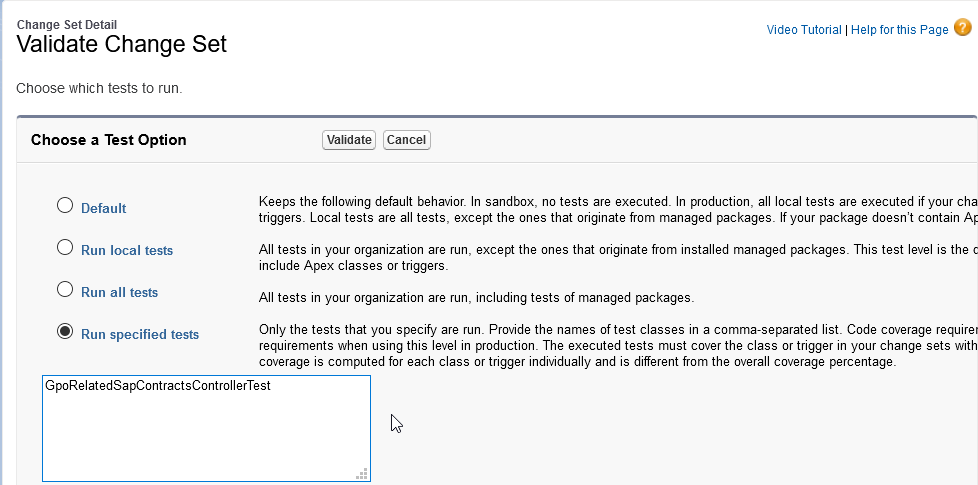
And the proof:


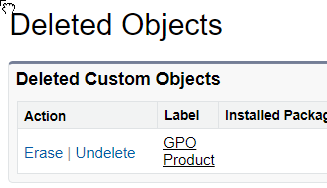
When creating Custom Objects with Change Sets it is not uncommon to get an oops. The difference between a smooth production release and one that leads to late nights is dealing with the issue from the root rather than the quick fix that might be forgotten between the test and the release. Sometimes going back to the beginning requires deleting the object from the target. Recently I learned that (the hard way, as usual) that deleting the object may not delete everything about the object.
In the case of a master-detail relationship, deleting the detail object does not remove the relationship to the master object. This is discovered when attempting to re-deploy the detail object in a subsequent, improved change set.
To address this, after deleting objects that you plan to re-create with a change set: