Challenge Not Yet Complete

Salesforce Trailhead “Challenge not yet complete” most common causes

Ah, Spring is in the air. So are arms, as people new to Salesforce throw them up during Trailhead challenges where they can’t seem to get the hands-on part to pass even though they see the result they expect.

The Trailhead modules and Superbadges are so well organized and written, it may seem like there is an instructor reviewing you submissions, but that would not be practical, profitable, or in the spirit of a cloud platform. The scoring is done by automated tests that are checking that things match exactly as the instructions provided.

The most common cause is that the learner has mis-typed a value provided, usually the API name (i.e., my_variable__c). Runner up to this is the experienced user who is new to Trailhead and uses their own naming conventions rather than following the instructions (been there, done that).

The third common cause is that the module content was updated but the test was not (doesn’t happen that often, but you can tell when there are a bunch of questions on the Trailhead Community about the same problem).

Here’s another I often see. Some of the lessons are re-used between modules and trails, or were once in a different order. Regardless of how it got to be, the instructions may say to create a new playground when one has already been created for the module or trail, and work done previously is required to continue.

A couple of similar issues to the above I have also seen is when there are steps described in the lesson content and the challenge assumes these steps were done in the playground. Alternatively, it is sometimes not clear to new Trail Blazers that the same playground should be used throughout a given module or trail, or they inadvertently select to create a new playground or select the wrong playground. Personally, I use a collection of Developer orgs instead of playgrounds to make it easier to go back and find something I had done previously, but I don’t recommend that for most beginners.

This is not an exhaustive list. If you got through it and still haven’t seen Assessment Complete! +500 points, read through the module from the start as if you had never seen it before. Depending on your input processing style, you may want to wait a day or two. Or post a request for help on Trailhead and be sure to include a link to the lesson and module in your request. And feel free to tag @Scott S Nelson.

HTH

If you found this interesting, please share.

© Scott S. Nelson
Webhook Screen

A quick and simple Salesforce webhook listener

Quick summary: How to set up your Salesforce org to listen for webhooks

Setting up your Salesforce org to listen for webhooks should be easy. Actually, it is easy, but it seems the steps are buried in different places like Horcruxes. I’m going to assemble them here, and if He-Who-Must-Not-Be-Named shows up, he can proof-read this for me.

So, we start with a simple Apex class. There are a bunch of examples of this. The easiest one for a quick start is in the Salesforce blog post “Quick Tip – Public RESTful Web Services on Force.com Sites.” Remember, it is a quick demo. Your final code should look like something between that and the example from the Salesforce Apex Hours video “Salesforce Integration using Webhooks.” My example is:

@RestResource(urlMapping='/hookin')
global class MyWebHookListner {
    @HttpGet
    global static String doGet() {
        return 'I am hooked';}
}

Now, the tricky part is that the Quick Tip blog has instructions and a screen shot of “just need to add MyService to the Enabled Apex Classes in the Site’s Public Access Settings,” followed by a wonderful example of a sample URL. Because I used Sites and Domains customizations once for a Trailhead exercise six years ago, the connection did not immediately click for me, nor the other steps. I will save you the tedium of reading all that I went through, which included pausing the aforementioned video several times to capture the exact steps and summarize them for you here.

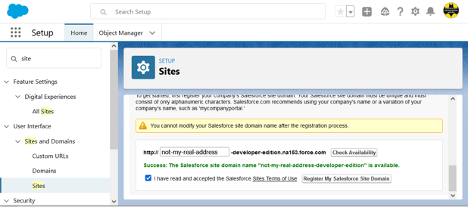
In Setup, search for “site” and select User Interface > Sites and Domains > Sites from the results. Create a site here if you don’t already have one (and if it is in production, make sure it is the URL you want).

Now, the tricky part is that the Quick Tip blog has instructions and a screen shot of “just need to add MyService to the Enabled Apex Classes in the Site’s Public Access Settings,” followed by a wonderful example of a sample URL. Because I used Sites and Domains customizations once for a Trailhead exercise six years ago, the connection did not immediately click for me, nor the other steps. I will save you the tedium of reading all that I went through, which included pausing the aforementioned video several times to capture the exact steps and summarize them for you here.

In Setup, search for “site” and select User Interface > Sites and Domains > Sites from the results. Create a site here if you don’t already have one (and if it is in production, make sure it is the URL you want).


If you created the domain just now, scroll down after clicking the Register My Salesforce Site Domain button and click the New button at the bottom. Fill in only the required fields (remember, this post title starts with “Quick and simple,” not “Safe and secure” … though you should do that on your own until I write that version), and Save (there may be a delay before the screen refreshes … be patient, as clicking it again will cause it to try to create another site and give you an error message). If you already had a site, click the site name in the list at the bottom of the page to get to Site Details page, specifically, the Public Access Settings button.

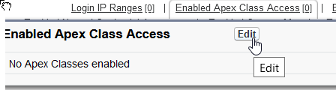
Here we want to find the Enabled Apex Class Access link and click it or the Edit button that pops up on hover:

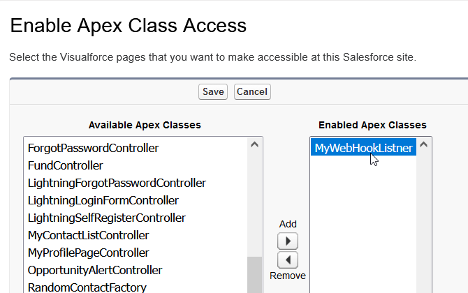
And finally we get to the screen shown in the Salesforce blog post that lets the magic happen:


Add your class, save, and you may need to navigate again to the bottom of the Sites page and click the Activate button to activate the site you have created.

Now, take the site URL and add services/apexrest/[urlmapping] (the value used in you Apex code for urlMapping=) and go there. (The full URL will look something like “https://my-developer-edition.na9.force.com/services/apexrest/myservice,” with the bold text matching your site address and urlMapping, respectively.)

If all went well, you should see what ever nifty response you set as a return string, at which point you can get rid of the return string and do the serious stuff you want to do with your webhook. If not, drop me a line describing exactly what happened and I’ll try to figure out which of us skipped a step.

Also, for that security stuff I had said I wouldn’t cover, I do have to recommend that you:

  • Make sure that you handle all verbs and kill off the ones that aren’t expected.
  • Check the referrer for matching where you accept requests from.
  • Validate the format of the request matches what you expect.

Again, there may be more details in a future post. This one was just to make sure I didn’t have to go on another Horcrux quest.

To summarize all of above cheekiness into a set of steps:

  1. Your webhook class will be a RestResource.
  2. You must have an active Salesforce Site.
  3. You need to enable your RestResource Apex Class under Public Access Settings for Salesforce Sites.
  4. Your listener URL will be your Salesforce Site address/services/apexrest/urlMapping.
  5. You should secure the heck out of the class and processes before letting it access anything beyond a simple response string.

Originally published at Logic20/20 Insight

If you found this interesting, please share.

© Scott S. Nelson

Lightning Email Template Builder Newbie Gotcha

While the Salesforce Winter ’21 Release Notes mention:

NOTE Email Template Builder isn’t available for previously created Classic and Lightning email templates.

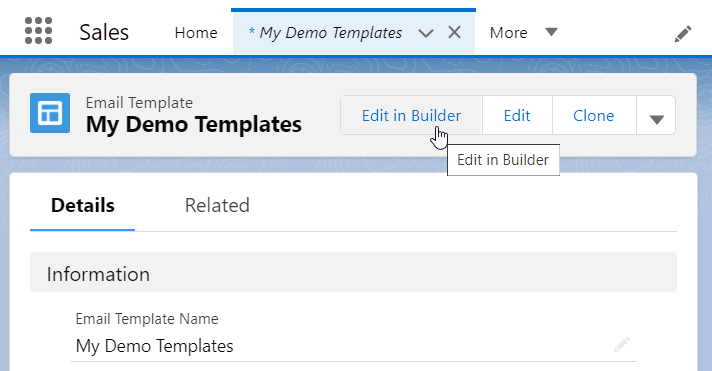
What I did not expect is that it doesn’t matter so much that the template was created before the release, but that the creator of the template had been granted the Access Drag-and-Drop Content Builder System Permission (per Select Who Can Work in Email Template Builder) before creating the template.

How did I discover this? I created a template as a System Administrator and did not see the Edit in Builder button. I then created a permission set and added it to my profile. Still not there. I then spent a lot of time trying different browsers and turning the permission off and on again, all to no avail. Then I created another template and, voilà!  there was the button.

I am either the only one dumb enough to perform the steps in this particular sequence or brave enough to admit it, as part of the time spent figuring it out was searching Trailblazers and https://salesforce.stackexchange.com for answers or even similar problems.

If you found this interesting, please share.

© Scott S. Nelson
Salesforce Certified Platform Developer I

Become a Salesforce Certified Platform App Builder

This is about my journey to pass the Platform App Builder certification exam. Yours will probably vary, and I hope this article is part of it.

For me, Platform App Builder is my third Salesforce certification. I passed the Administrator exam in 2018 and the Platform Developer I certification in 2019. 2020 I was too focused on expanding the Logic20/20 Salesforce Capabilities to study for an exam.

I have admitted in the past, and will repeat for clarity here, that much of my blogging is driven by having searchable notes on how I accomplished something so that when I need to do it again I can readily remind myself of what worked. My certification posts show a pattern that is working: Work with the tool, takes a course, take a diverse set of practice exams, then do it for real. Patterns are great for planning, though the devil is in the details, and I will get to those in just a moment.

Before getting to the good stuff, it is important to note that there is a key part of the pattern that is missing from those previous post, perhaps the most critical aspect: a genuine interest working with the tool that I want to be certified in. The value of this is clear from my first certification for the WebLogic Portal (RiP). I didn’t study for it at all, I just took the exam and passed (barely). I took the exam because it was required by the company that acquired the product. I had passionately worked with it for several years, and expected passing would be easy. It wasn’t, because certification exams are more about knowing things than doing things. Doing them does help to know them, just not as much as I would have thought. Anyway, it is that interest in doing that motivates me to acquire the knowing necessary for certification.

As a mentor, I frequently hear the same concern from people that are learning something new outside of their day-to-day work: It can be difficult remembering things by only reading or hearing about them. Learning exercises are often not enough as they are structured for success and the simple step-by-step instructions become a validation in following instructions rather than an acquisition of the knowledge necessary to perform the task. One thing I had done to rapidly accelerate my abilities in WebLogic Portal was to spend an hour each morning reading the community posts and answering questions. Not only questions I already knew the answer to, but also the ones I did not, by figuring it out, validating it, and then responding. Years later, I applied this technique again after becoming an Informatica Cloud Master. As many people know, solving real-world problems helps to lock in the learning. What I learned with WebLogic and Informatica is that there a plenty of real-world problems to solve beyond my own daily work.

In the case of Salesforce certifications, I can honestly say the best study technique was getting in to the Top 10 on the Trailhead Community Answers Leaderboard.

Beyond the community participation, the App Builder certification was the first one where I did not have frequent “ah ha!” moments while taking the trainings. The first (and last…I repeated it a day before the exam) training I took was the free one Salesforce offers on their Certification Days page. It is certainly worth taking for the pattern tips of how the exam questions are structured, such as (paraphrasing) “If there is a choice that suggests anything other than a declarative approach, it isn’t that one” and “Watch out for choices with multiple parts where most are correct. They must all be correct.”

I’m still a big fan of Udemy. I am also frugal, so I enrolled in Mike Wheeler’s Salesforce Platform App Builder Certification Course during one of the frequent sales. It’s a good course, though a lot of material is dated and it gets a little annoying to hear him complain about features that have long since been improved. The course does not include a practice exam, but I have found that courses that do have few more than the number of questions on the actual exam. The problem with that, is that there are way more questions available, and each exam consists of a random set of questions (within the ratios as described in the official study guide).

The App Builder Certification is one of the more popular ones. I think this is partly attributed to it being in the “Developer” category of certifications while requiring no knowledge of coding, and partly because Salesforce heavily emphasizes that coding isn’t necessary and should be avoided. Having been a consultant for a software vendor, I understand the value of declarative solutions because it is safer for regular vendor updates. I will also say that knowing nothing about the implications of technical choices can be a huge disadvantage even if everything is done declaratively. But I digress…

The practice exam package I went with from Udemy was Salesforce App Builder Practice Test [325 Questions] WINTER’22. There is great diversity in the questions, though there are several that are the same general question with subtle differences. They are spread through 5 timed tests. I didn’t do the actual math, but I think that while the total of all questions are in the correct exam ratio (23% Fundamentals, 17% UI, 22% Data Modeling, 28% Logic & Automation and 10% Deployment), I believe only 2 of the sets are correctly spread across topics. For me, reporting is a weak other (I generally delegate that work), and I found myself failing some of the practices where reporting questions were too heavily waited.

The value of practice exams is not memorizing the answers (don’t, because they change to avoid just that). The value is in learning weak points and shoring them up with some reading or Traihead modules.

As I mentioned, the App Builder is a popular certification, and there are a lot of other offerings on Udemy for practice exams. I made the mistake of buying one several months before using it and could not get a refund. I did get a refund on another that looked really good in the description but was outdated and contained several answers I knew were wrong. There are also several free video dumps on YouTube, and I found that many were also inaccurate, besides being the wrong medium for this type of studying (at least for me).

So, to summarize:

  • Get interested in what you are studying for
  • Attend one of the free Salesforce prep trainings (you also get a discount on your exam with the training!)
  • If you don’t get to build apps often at work, go help people on Trailhead to gain practical experience
  • Pick a good training course on Udemy when it is on sale and check it right away for quality and get a refund if it sucks
  • Pick practice exam set on Udemy with lots of questions and check it right away for quality and get a refund if it sucks
  • Follow me on Trailhead (not really necessary, but you may find some interesting answers)
If you found this interesting, please share.

© Scott S. Nelson
MFA

Salesforce MFA and the Salesforce Platform User License

I’ve seen a lot of FUD around the new MFA requirements from Salesforce. Understandable, given there are many people tasked with managing this who do not have experience in managing it.

One common question is around API integrations and how to do MFA. While this can (and in some situations, should) be done, it is not required.

From Salesforce Multi-Factor Authentication FAQ:

Publish Date: Dec 13, 2021

How will Salesforce exclude MFA-exempt user types from auto-enablement and enforcement?

There are several user types, including API/integration, automated testing, and RPA accounts, that aren’t required to use MFA. We’re currently working on plans for how customers can exclude these types of users from future auto-enablement and enforcement milestones. We’ll update this FAQ and your products’ documentation when more information is available.

See also:

So, in conclusion just set it up with a Salesforce Platform User License, generate a token for that user, then use the APIs to login or login with username and Password+security token, depending on the application.

HTH
Regards,
Scott S Nelson

If you found this interesting, please share.

© Scott S. Nelson