Informatica Cloud SAP iDoc Writer Connector GPK and GFK Gotcha

It is great that Informatica provides an SAP iDoc connector rather than having to manage such a complex integration manually. Connector-specific validations happen at the connector level, so it makes sense that the required GFK or GPK fields are validated as having a value at run time rather than design time.

In the version as of this writing, the validation only checks that the fields have values set, and not that the values are valid within the same iDoc. To clarify, the GFK and GPK values specific to a mapping would be impossible for the connector to validate as they are very enterprise-specific. However, while it could be assumed that validation within the specific mapping instance would occur to check if a GFK in one segment matches the GPK of the segment it must relate to, that is not the case. The developer must be careful that these values are set correctly within the mapping and valid between the segments.

If you found this interesting, please share.

ICRT Process User Roles and URLs

I am in complete agreement with the current wisdom of designing security in from the start. When developing, it is often more expedient to leave the security out until everything else has been tested to reduce the number of parts that need to be evaluated when debugging, and I (for better or worse) take the expedient path most of the time.

Recently I built some Informatica Cloud Real Time (ICRT) Processes intended for use as web services and built them with Anonymous access allowed up until completion, at which point I added the authorized users to the list to lock them down. And then found that they would not run when provided the correct authentication.

I will spare you the many things I looked at to resolve the issue and simply point that my excuse for it taking so long was the nature of the response when calling the service, which was “HTTP Status 403 – User is not authorized to perform operation within tenant context”. With that error my pursuits at debugging were focused on security configuration.

The actual source of the issue is that once the process is deployed requiring authentication, it uses a different URL format. To wit the unauthenticated structure is:

https://[SEGEMENT] .rt.informaticacloud.com/active-bpel/public/soap/[ORG ID]/[PROCESS NAME]

and the authenticated URL is:

https://[SEGEMENT] .rt.informaticacloud.com/active-bpel/soap/[PROCESS NAME].

So, be sure to publish the correct authenticated URL to clients while developing and update your test client when finalizing.

If you found this interesting, please share.

Sometimes Two Processes are Better than One

This is a short post to save people the time of discovering that what is usually thought to be more efficient is not in one case…

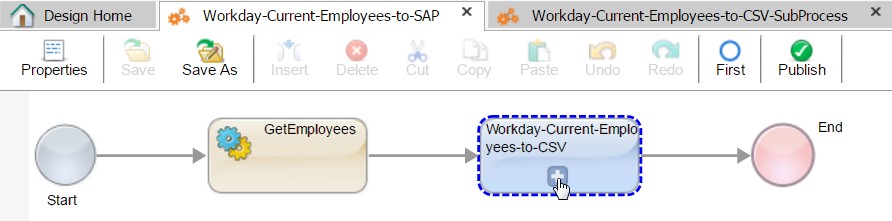
I’m working on some ETL integrations where the source is sometimes so complicated that it is too painful to work with it within the Informatica Cloud Mapping Designer. Fortunately, the customer also has Informatica Cloud Real Time, which has some handy APIs for accessing and re-arranging data from ReST and SOAP services. In one particular case I need to get check each record before sending the result set to a Mapping Task. I followed an example where one process calls a sub-process that is designated to apply to only the object type of the record being processed (a simplified version is depicted below).

Top Process calling Sub-Process for a List
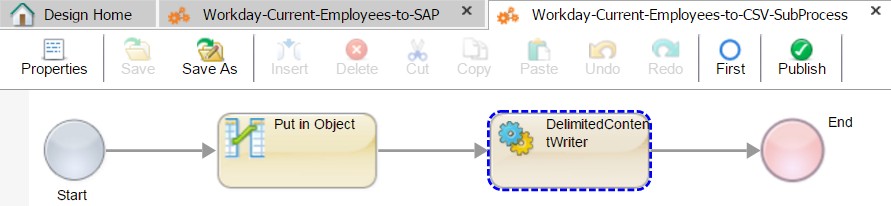
Sub Process that Writes a Particular Object Type to a file.

This worked as described, though looking at the resulting process, it seemed that I could eliminate the sub-process by recursing the file writer call inside the first process.

One Recursive Process Writing a List to a File

The recursion approach worked, but it was much, much slower than the approach of handing off the file writing task to the sub-process. This seemed unexpected given the minimal processing being done, but there you have it.

If you found this interesting, please share.

How to Encrypt and Transmit Files in Informatica Cloud with a Single Mapping Object

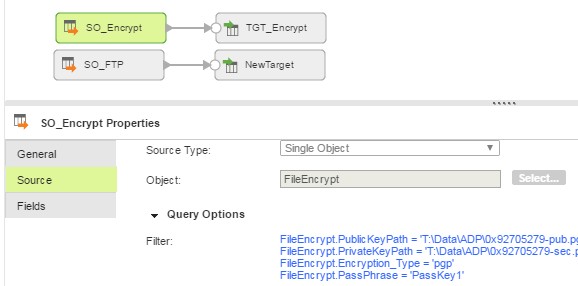
Recently I had the need to encrypt a file before sending it via FTP. A colleague of mine (JayJay Zheng) had discovered that a Mapping object could perform an FTP by configuring the Source transformation with a File Processor connection and then entering the FTP connection details as Query Options on the connection as shown below:

SFTP with a Mapping Object

When it came time to encrypt the file prior to transmission, I found KB 476543, HOW TO: Encrypt the data in Data Synchronization task within Informatica Cloud, which did the trick. But in a later design review session, the same colleague pointed out that the number of objects to be maintained could be reduced by using the same Mapping configuration approach as done for FTP with the encryption and running them in sequence within the mapping:

Encrypt and FTP in one Mapping with Piping
If you found this interesting, please share.