Most of the solutions I design and develop are deployed to a Linux server. Before “DevOps” became a thing, there were always server admins ready willing and able to help with setting up the deployment environment and handling the day-to-day maintenance afterwards. Lately I have been left to my own means to get these tasks done and have learned some commands, written a several bash scripts for repetitive or automated tasks and bookmarked enough reference sites to be productive while still not considering myself an expert and definitely not an administrator.
So, being cautious, I prefer to have a virtual machine that is close to the environment I will be deploying my work to, especially bash scripts that can bring things down faster than they build them up if there some errant typo in the right-wrong place. I once built the duplicate virtual machine image from scratch, which I found to be a painful and dissatisfying experience given that I wanted the machine chiefly due to my lack of expertise with the finer points of configuration and administration. The next best thing to building it yourself (or first best thing, in my case) is to find one that is already pre-built and then add the necessary customizations to it. There are a plethora of free Linxu VM images out there, and finding one that is fairly close to the enterprise standard of my current client is usually fairly simple. The one thing that is almost always an issue is that the free images have a small hard drive in the configuration. If it is a case where another drive can be created and mounted, great. But recently I ran across a production configuration where the everything was off the root mount and I finally figured out how to enlarge the drive on the VM image without too many headaches. Here is how I did.
First, this is based on using VirtualBox. I have not used VMWare in a long time, but I believe the first stage of enlarging the capacity on VMWare may be even easier than with VirtualBox, which is where we start in the slide show below.
To save writing down the command from the slide show, you can copy and modify the following:
I sometimes find a need to manage a timestamp with ICRT and prefer not to add a database to the mix unless necessary. This process will set or get a timestamp from a Linux server and can easily be modified for Windows if necessary.
Informatica introduced their cloud initiative back in 2006. It has grown to encompass many data-related services including cleansing, EDI, MDM, etc. To set the context of this writing, by “Informatica Cloud” it is meant to include only the separate-but-related application- and data-centric aspects, sometimes referred to as the Informatica Cloud Integration Platform as a Service (iPaaS). iPaaS includes the Cloud Data Integration functionality based on (and separate from) their flagship Power Center ETL application and the Cloud Application Integration based on (and distinct from) the ActiveVOS platform that Informatica acquired back in 2013.
To save bytes, Informatica Cloud Data Integration will be referred to as ICS, and Informatica Cloud Application Integration (a.k.a, Real Time Integration) as ICRT.
Software Silos
Given the background, it is not very surprising that ICS and ICRT are mostly used separately for their key purposes. If there is some data that needs to move from system A to system B, ICS is the tool, and if a workflow needs to happen in real time, ICRT is the way to go. Both of these are valid assumptions, and the fact that ICRT is an additional cost to the default ICS included with iPaaS strengthens this viewpoint.
ICS provides a robust API for managing objects and running tasks. There is a connector in ICRT that provides wizard-driven access to the ICS API. ICRT processes can be exposed as web services that provide both a SOAP and ReST interface. In short, despite their distinct natures, ICS and ICRT can be easily integrated out-of-the-box (or, out-of-the-cloud, in this case).
Gain Elevators
Informatica provides ICS connectors for many third-party systems that are frequently integrated through ICS, such as SAP, Workday and Salesforce, in addition to common protocol connectors like SOAP, ReST and JDBC. In theory, there are very few systems that cannot be integrated in an ETL-manner using ICS, and this is also true in practice. That said, “able to” and “easy to” are important factors to consider when planning an integration project within delivery scope and maintenance goals.
Most of the connectors for ICS are also exposed in ICRT when enabled or installed. ICRT has a very robust architecture for creating Service Connectors to SOAP and ReST services that can be used by Processes that can in turn (as mentioned earlier) be exposed as SOAP or ReST services.
Super Mash
Not all web services are created equally. Where some provide a straight-forward interface to elicit data in a format ready for inter-platform translation, most are intended for look ups and transactions rather than being a source for batch-loading data. Informatica provides some connectors that wrangle popular APIs, such as Salesforce.com, into a structure that is easy to work with. Other services may have a connector that is more suited to being an ETL target, or meant more for the “citizen developer” to be able to load data into reporting format. Informatica also provides standard ReST and Web Service adapters, but if the API response is several layers deep it can be complex and confusing getting at the values using a graphical design platform such as ICS.
Fortunately, ICRT provides a way to quickly create a Service Connector for any standard API. The Service Connector provides a wizard to turn the API response into an object that can then be streamlined and simplified for easy management in an ICRT processes. The ICRT process can perform further transformations, such as renaming fields and formatting data types, or simply act as a pass-through for outputting the more digestible response format.
Once the ICRT process is connected to the Service Connector, you have the option of beginning your integration in either ICRT or ICS, depending on the nature of the integration. For example, if there is a great deal of processing to be done in ICRT before the data is ready for ICS, it is simpler to initiate the process in ICRT, output the service response to a disk location, and then call ICS to perform the ETL steps with the file as a source. Alternatively, when the response is quick or ICRT is only acting as a proxy to simplify the response, the ICRT process can be exposed as a service and that service called by ICS as the ETL integration source.
For Instance…
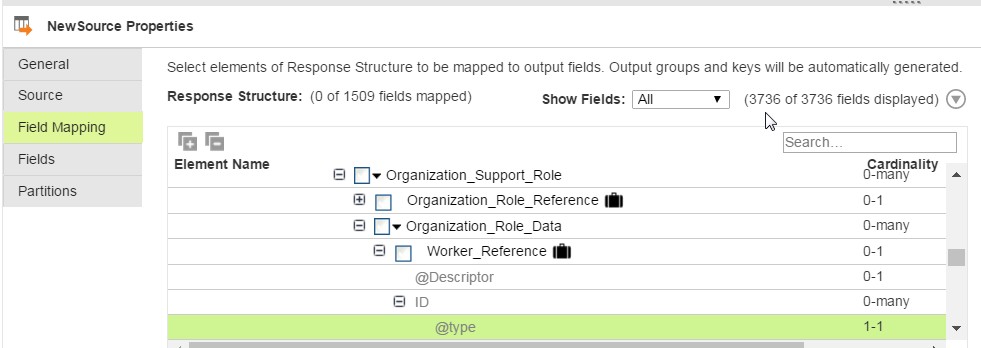
Here is a real-world example of where this approach is useful. Informatica provides a perfectly functional connector to Workday. The connector provides full access to the Workday APIs. The Workday APIs, however, are not very simple to use. They provide a some control over the response format, but anything beyond limited data in common fields is deeply nested within complex objects. Note in the image below the number of fields available:
Workday ICS Data Source
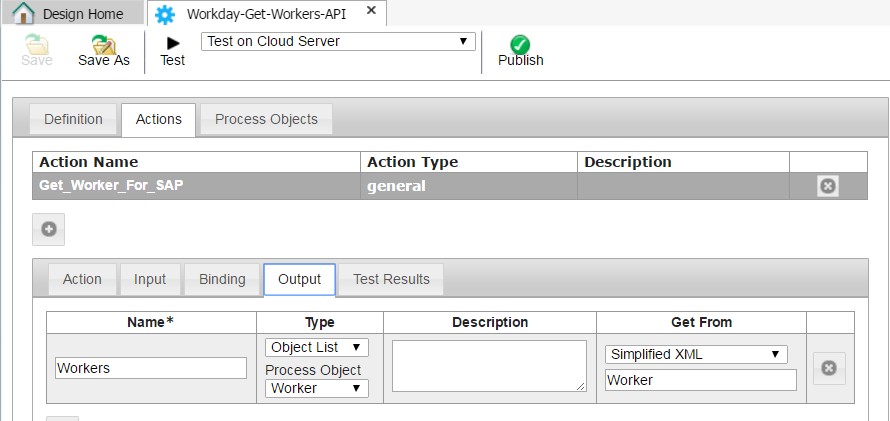
Using an ICRT Service Connector, we can take this complex response and immediately simplify it:
ICRT Service Connector Simplified XML Object Definition
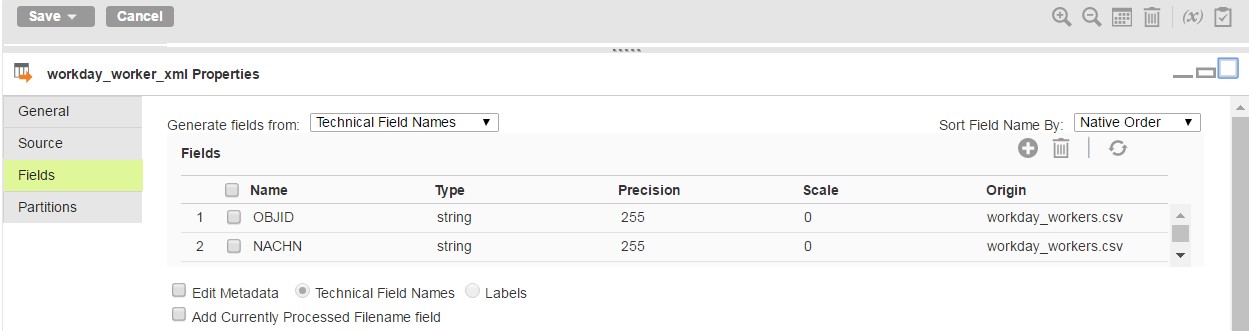
The Service Connector above can be run by an ICRT Process that will map the fields to a process object with the same names as the target system fields (SAP in this example) and then provides them directly to the mapping as a flat data set:
Simplified Source in ICS from ICRT
Granted, the mapping could still have been accomplished without the use of ICRT. By introducing ICRT as a proxy to the web service, development can be done faster by parsing simple XML rather than traversing complex nested objects. With the field names being defined in ICRT, if it is necessary to redefine the field sources there is no need to trace back through transformations in a Mapping to locate what may have been impacted.
Avoid a Clash
Only one instance of a Mappings task can be running at a time. To avoid the error “The Mapping Configuration task failed to run. Another instance of the task is currently running”, use a unique Mapping Configuration Task per process. In the case of Data Synchronization Tasks, many of the same tasks can be performed by a mapping, which can have multiple Mapping Configuration Tasks calling.
Conclusion
In most cases Informatica Cloud Data Integration functionality is all that is needed and desired to integrate data between systems. In some cases where web services are the source and the format of the service response is nested and complex, using Informatica Cloud Application Integration as a proxy service to simplify the response to just the fields needed for transformation can be a time saver both in the creation of the integration and its future maintenance.
A casual search of the Informatica Network Knowledge Base for the terms “send email notification from ICRT process” will yield https://network.informatica.com/thread/52346 in the top results. This is a fine solution if the process is being used with Salesforce or related to a Salesforce integration.
If your integration does not have a Salesforce component to it, you would continue to search and most likely run across KB article 441540 “HOW TO: Email from an Informatica Process Designer (IPD) in ICRT”. I can guarantee this approach will work as I have implemented it successfully after figuring out that:
The BPR deployment targets are reversed (eventually obvious when looking at the file names)
The process must be called from the Secure Agent, meaning to call from an exposed service it must be called as a sub-process
At the end of the steps, the article notes that
“As of Jan 2016 there is no direct service or function exposed that the users could leverage to send an email to some recipient.”
I appreciate that they date the point in time when this is the case as good a documentation best practice. Another best practice I have used is to create a support ticket to check for when an update is available and then update the dated documentation I have published. I recently discovered this is not shared by everyone 😛
If you are reading this now, I suggest you save some time and skip the above references and go to the February 2016 release notes (yup, with just a few weeks of the helpful KB date) and discover the Email Connector that is now available. It does all the same stuff, with the same limitation of needing to call from the Secure Agent, but with much less hassle.
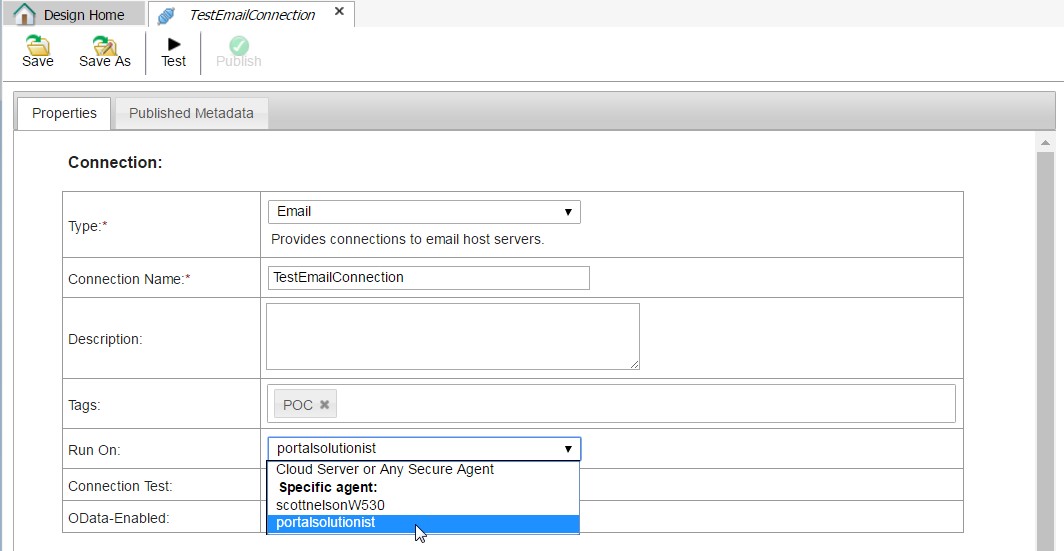
I discovered the availability of the new Email connector when I was putting together reference links in preparation for this article. Using the connector is very straight-forward. The connection configuration screen is mostly intuitive, though you have to select a Specific Agent for the Run On option even though the option for Cloud Server or Any Secure Agent is available in the drop down.
You can download a basic set of example components to see how to use the email functionality here > ICRT_Test_Email_Example.zip. To use the example, follow these steps:
Open TestEmailConnection, select a valid Secure Agent for the Run On setting and update the Connection Properites with valid email server and credential values, then save and publish.
Close the TestEmailConnection, refresh your screen, then open TestEmailProcess and select the same Secure Agent you selected for the TestEmailConnection Run On setting for the Run Process On setting, then save and publish.
Close the TestEmailProcess, refresh your screen, then publish TestEmailGuide.
Finally, click the Run Guide link next to the TestEmailGuide name and see for yourself that it works.
I found no mention of the additional settings described in KB article 441540 in reference to using the connector, and that could be because they are no longer necessary. Note that I did not have an ORG where I had not already used the KB solution and I did not roll back those changes for a start-to-finish test because of the amount of time it would have added to making this article available. You may need to refer to the KB solution for additional settings when adding this functionality to your own ORG.