CSV, XLS, SFDC, Oh my!

CSV, Excel, and Salesforce

The upside to modern PCs is that so many file associations are created for us automatically. This is offset to a degree because the default setting in Windows is to hide file extensions, so that what you see is just the name and an icon. This is especially problematic for CSV files as most people who use Windows have Excel and since the friendly green icon is fronting the file the habit to just click it prevails.

Sometimes, this association is fine. Simple text data delimited with commas or tabs can be converted to Excel format with no manual intervention and everything looks fine. But, if any of the fields have commas, or are dates or numbers, than Excel makes lots of assumptions that it doesn’t tell you about and changes the data to match the assumptions. One does not need to be a data scientist to know this is bad. Indeed, one only needs a pulse to be annoyed by it, and if you don’t know why the data is being messed up, frustration is a common reaction.

The first thing I recommend is to change your Window settings to show file extensions. There are instructions provided by Microsoft for this here.

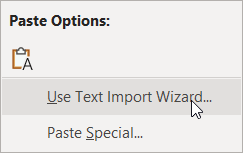
Next, develop the habit of opening CSV files using one of the more time-consuming (and reliable) methods. Method 1 is to open the CSV file in a text editor (my personal preference is EditPad, and there is a good list of others here). Then create a new Excel workbook or sheet, copy the contents of the CSV file from the text editor and use the Paste > Use Text Import Wizard option.

Use Text Import Wizard paste option

The simplest approach is to accept the defaults on the first two steps and on the third step select all columns by holding the Shift key, scrolling to the right and click the last column, and choose the Text column format.

Text Import Wizard Step 3 select all columns and Text format

This will create a clean separation by column with no auto-formatting applied. Then Finish and you will have the data as you expected.

For larger files, I suggest reading this thread on SuperUser.com.

When creating data in Excel for CSV upload, format all the columns as Text before saving as CSV.  If you have to do the same data transforms regularly, I recommend creating a template with formulas.

Probably the hardest habit of all for most users to adopt is when opening the file in Excel just to view its contents is to select No when prompted to save the changes.

If you found this interesting, please share.

© Scott S. Nelson
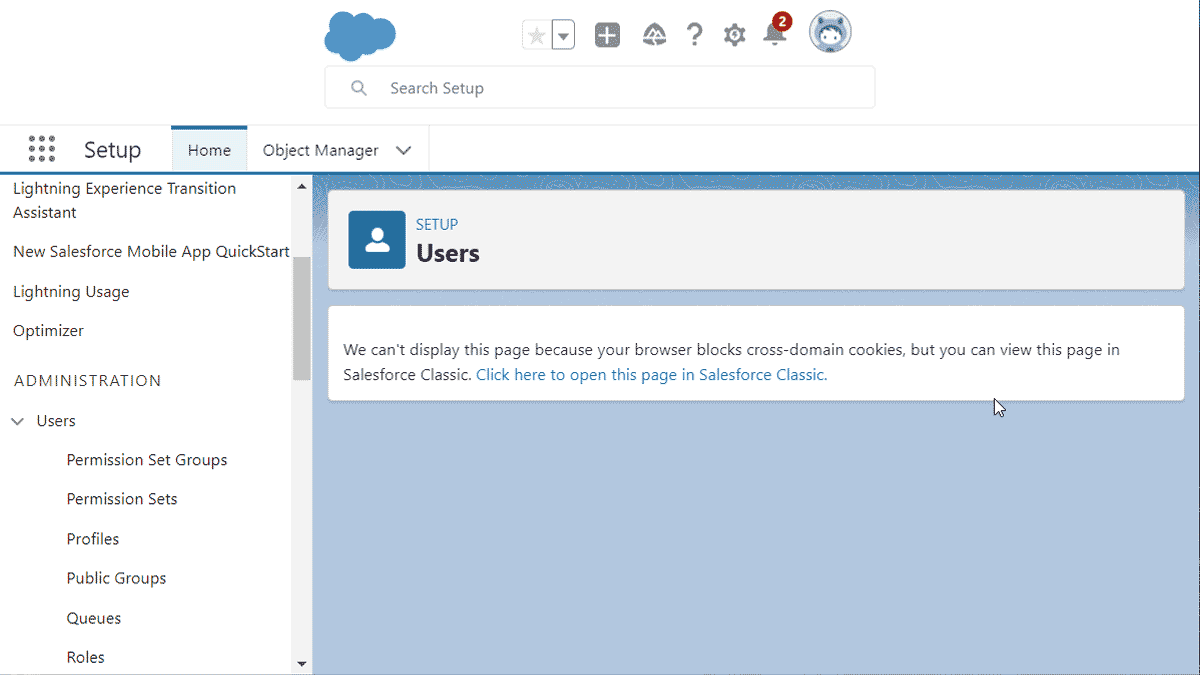
We can't display this page because your browser blocks cross-domain cookies, but you can view this page in Salesforce Classic. Click here to open this page in Salesforce Classic.

Salesforce Lightning Admin browser blocks cross-domain cookies use Classic

I see lots of other folks running into this and thought I would post the fix along with my thoughts. (TL;DR).

The error message is “We can’t display this page because your browser blocks cross-domain cookies, but you can view this page in Salesforce Classic. Click here to open this page in Salesforce Classic.” It can happen in several screens and is a result of some of the base domain changes that Salesforce has been making coupled with the security changes browsers have been making. For chromium-based browsers (Edge, Chrome, Brave, etc.) the fix is to add your domain to the cookie exception list.

With screens, the process go as follows:

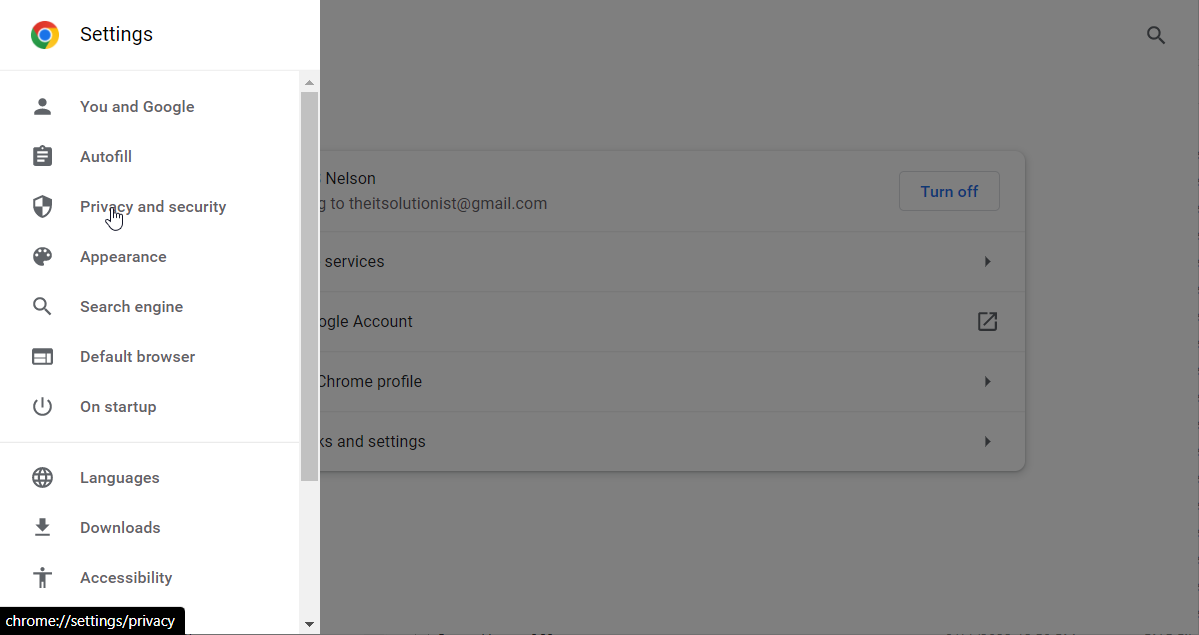
Go to Settings > Privacy and security
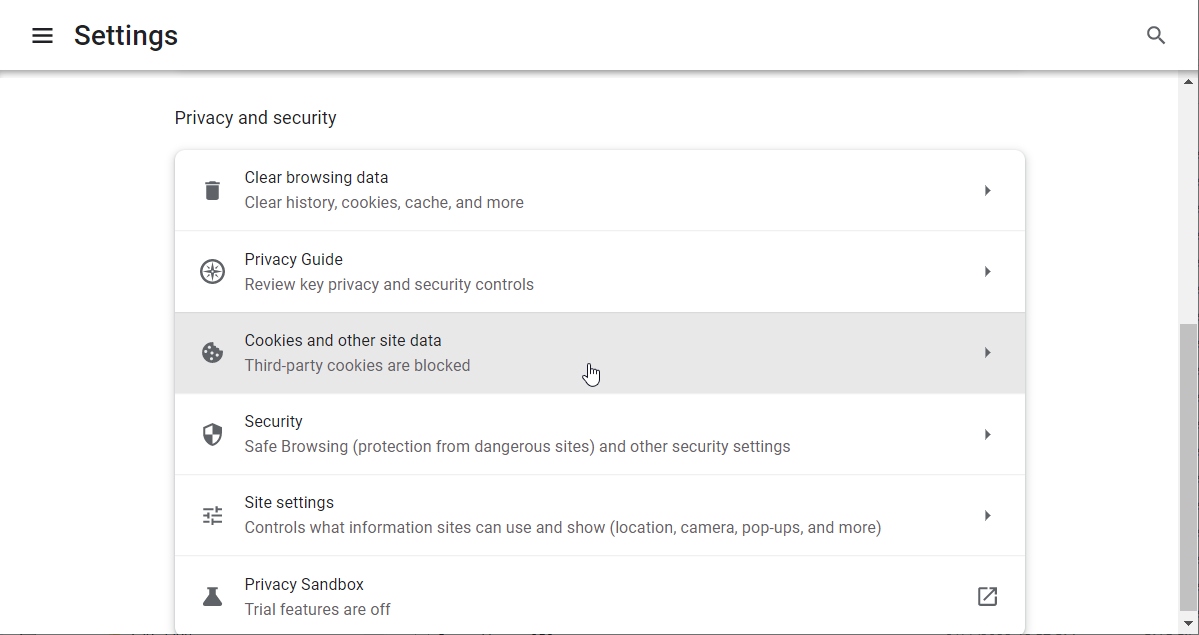
Select Cookies and other site data
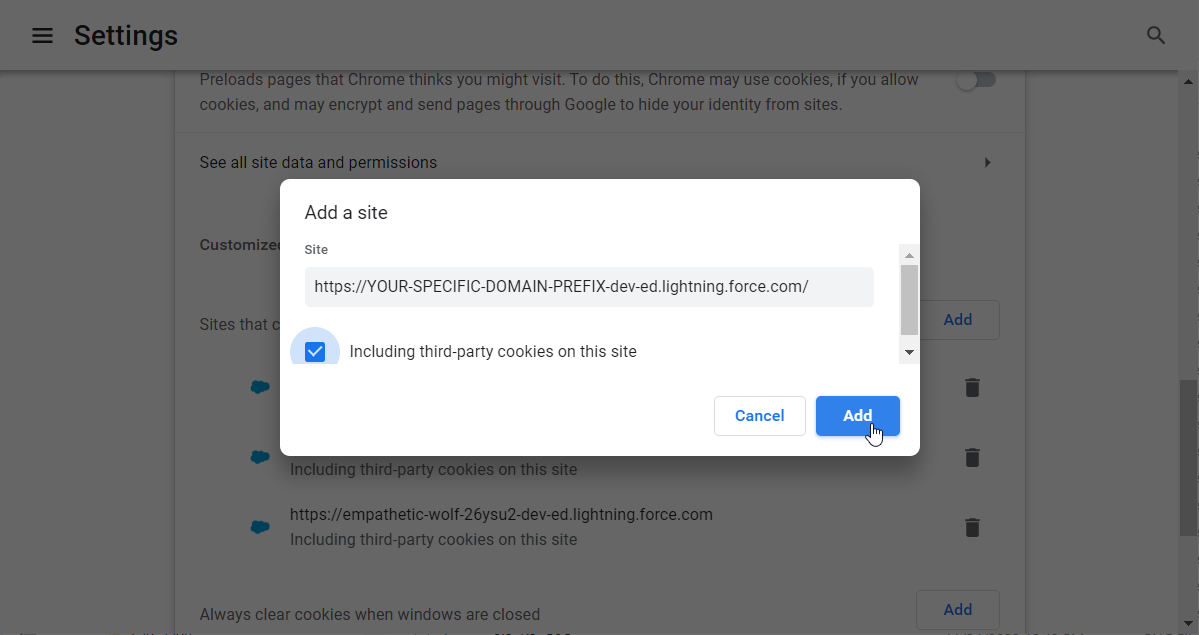
Under Sites that can always use cookies click the Add button
Paste your SFDC domain path in the Site dialog and Check Including third-party cookies on this site

Click the Add button and

Refresh your Salesforce screen [F5]
Tada!

Note: You could use a wildcard in place of the sub-domain for all salesforce domains, but I don’t recommend that as it would leave you vulnerable to some miscreants that use their orgs for nefarious purposes.

To summarize:

  1. Go to Settings > Privacy and security
  2. Select Cookies and other site data
  3. Under Sites that can always use cookies click the Add button
  4. Paste your sub-domain and domain path in the Site dialog
  5. Check Including third-party cookies on this site
  6. Click Add button
  7. Refresh your Salesforce screen [F5]
If you found this interesting, please share.

© Scott S. Nelson

The SFDC-SAP Integration from Heck

Here’s a requirement you don’t get every day: There is a cloud system (Salesforce in this case, though it could be any) where users will create records that reference source data existing in SAP. Nothing special so far. Because of the fluidity of the data, there will be times when some of the information will be known by the user in the cloud before it is entered in SAP. This is less common, but bi-directional integrations happen all the time. As they should. Which would have made this somewhat easier. But not here.

OK, well, we just have a business process that says if the data isn’t available yet, then come back and finish later. Nope, that won’t work, either, because the whole purpose of moving these processes from another cloud system is that business users do not want to do it that way. OK … I will save you the tedium of listening to all of the other scenarios that were floated up and shot down if you will trust me that the implementation team went through them all, leaving us with the following constraints:

    • The source-of-truth (SoT) is SAP.
    • The Salesforce application must receive updates from SAP.
    • The data may not exist in SAP at the time of initial entry in Salesforce.
    • The integration must be in batch mode.
    • The external identifier in Salesforce will be a combination of two fields in SAP.
    • The Salesforce record name for the value is non-unique and consists of a single field.

Again, I will spare you a long story of the various solutions that were discussed and discarded as insufficient. The solution consists of three parts (two if you are data purist, which I am not).

The solution

The first part is, how can we allow users to create new records in Salesforce when the SoT is SAP? Because the external identifier is a combination of two fields and the record name consists of a single field (when selecting existing records, users are required to review the matches before selecting), the first step requires two pieces. 1) If a matching record cannot be found, the user is allowed to create one. However, the record form only consists of the single Name field; 2) To prevent duplicate and orphan data, a Workflow Rule is created that triggers Field Update Workflow that combines the two fields used to set the value of the external identifier field (UniqueMaterialIdNDC) whenever the record is updated. The external identifier field has a unique constraint, so if a user attempts to create more than one new record with a Name field that has not been paired with the second part of the unique field (MaterialID), they are given an error message advising them that the value exists. This solves the human side of the equation.

The other part of the solution has to do with how we determine the data to synchronize with new values created by business users. This is similar to the “4 gallons from a 3-gallon and a 5-gallon jug” problem (which the internet seems to think originated with Die Hard 3, even though I learned it more than a decade before Die Hard 1, except without the math). The problem is one of perception, and the desire to avoid inelegant solutions.

The challenge is that every day a full update comes from SAP, and it is important to not create new records where partial records have been created in Salesforce, and yet still add truly new records as well as update existing records. And here is how to do that:

    1. The incoming batch from SAP is loaded to a holding object (SAP_Material_Master).
    2. Get a list of all Salesforce Records that do not have a MaterialID value (new SFDC Records).
    3. Get a list of all Salesforce Records that have a Name field matching the previous list (SFDC Potential Records).
    4. Get a list of all SAP_Material_Master records that have a match to the list of Names from the first list of SFDC records (new SFDC Records) as Potential SAP Matches.
    5. Remove every Potential SAP Matches record from the list that has a matching unique ID in SFDC Potential Records.
    6. For every remaining Potential SAP Matches record that has a matching Name in new SFDC Records, update the Salesforce Records.

(and now comes the hard part …)

  • Upsert all of the SAP_Material_Master records to Salesforce Records.

Why was that last one hard? Because it goes against all of our training to avoid redundant work. But here is the reality: Despite the simplicity of the solution above, it took a few days to design and then a couple more to develop and debug. Ensuring that the records were not updated redundantly would have taken another one to two days and saved .010 seconds in a daily batch routine. In this case, an inelegant solution is truly the best solution when the requirements and needs of the business are taken in to account.

This is why this was the Integration from Heck. Because the various business rules eliminated the “best practice” approaches, the solution had to deal with supporting the business needs while still being functionally reliable enough to be maintainable.

(If the title had you picturing someone with horns, a pointy tail and holding a large spoon, you are my people. If not, I still like you anyways :-))

Originally published at https://logic2020.com/insight/tactical-how-tackle-sfdc-sap-integration-from-heck/

If you found this interesting, please share.

© Scott S. Nelson

Life in the SaaS Lane*

TL;DR: The core SFDC CRM platform is an under-utilized way to build and provision robust, feature-rich, and cost-efficient apps with an appealing UX using mature low-code/no-code development.

Salesforce has grown from the $110m CRM ticker symbol established in 2004 to the over $150b1 best-in-class SaaS and PaaS leader it is today partly by continuously adding valuable capabilities organically and through strategic acquisitions. While all of the acquisitions have led to a broad suite of products, this article is focused on the under-utilized capability to provision apps using the core CRM platform.

A key factor to Salesforce’s popularity is the ability to customize how its products are used through configuration and custom coding. Its customers take advantage of this to manage the sales and support2 processes that make them stand out. Salesforce partners use this malleability to provide value-add functionality such as contract management, recruiting, specialized industry practices, etc., integrated into the Salesforce CRM platform. There is also a huge ecosystem of OEM ISV vendors that build solutions on top of the Salesforce CRM platform under their own names through licensing agreements. Most of these partner solutions have recognizable CRM process as part of their core offering or are immediately contingent to CRM processes.

But there is a great deal more that can be done with the flexibility provided by the Salesforce CRM platform than just CRM and its directly related processes. What has made the Salesforce platform so flexible is features such as Lightning Web Components, Lightning Pages, Flows, Connected Apps, and Platform Events. These capabilities make it very easy to create low-code/no-code (LCNC) apps that can be used by anyone in an enterprise with no knowledge of Salesforce or need to interact with CRM-specific functionality. Add to this the ability to create custom objects and develop custom functionality with APEX and SOQL and you have all the tools necessary to build applications that can do just about anything.

Does this sound familiar?

Let’s look at a common workflow for all businesses: an approval process. One person sends a request to another person for approval. In some cases, the first approver needs to get other approvals, or they may delegate the approval to someone else, or a series of approvers are necessary. Once approved, there is generally a completion action, such as being granted access to some application or having an expense reimbursed or a supply item ordered. Some of you may be surprised, even shocked, to know that there are organizations where that entire flow would be managed through email. Others will be wondering if there is any other way (we all have viewpoints based on our experiences).

For the folks who are surprised that such processes still happen over email, you may not be surprised that even processes managed through an application stall out because someone was on vacation or missed the notification to perform their task in the process, or someone clicked the wrong option and the flow terminated before completing with no notification to anyone. And even if all of that is a surprise, you still may start nodding your head to hear that the process is often accessed through an unappealing and inconvenient UI that’s difficult to understand without someone walking you through all of the steps. And if you are still thinking “no, my company has all that covered,” there is still the possibility that the perfectly working systems must be manually updated every 6 to 24 months because of some change in the vendor software it runs on. At this point, the hold-outs may very likely already be doing it with Salesforce.

Same SaaS, different view

This is not a new observation. There have been apps in the AppExchange for many years that provide solutions for non-CRM activities such as project management, employee onboarding, expense approvals, and asset procurement. Most major vendors provide an app to integrate their product with Salesforce. Yet enterprises themselves seldom take advantage of these capabilities with their own app development and management. One likely cause is the confusion around licensing. Users of specialized apps frequently do not require a full standard user license to be able to use an app deployed in Salesforce. There are many lower-cost licenses, the exact cost depending on an enterprise’s ability to negotiate based on other uses. Salesforce may be missing out on a lot of revenue in making these options difficult to reference and understand.

Even with a discounted license, the platform cost may be higher than other common options. Businesses that have a large license footprint with Microsoft or Oracle have app platforms available that, on the surface, may appear as more attractive alternatives.

While Salesforce is the most mature SaaS offering available (of the many articles that note SFDC as the first-ever SaaS provider, this article on Medium has the fewest ads or other self-promotion), enterprise software vendors such as Microsoft, CA Associates, and Oracle spend a lot of time, money (yours!), and effort convincing you to use their tools for everything. They have to push their offerings for a few reasons. First, while the companies themselves have been in business longer, most of their app offerings are either the result of an acquisition or a new option built to keep competition at bay. The tools themselves often have a negligible developer community, and there is no guarantee that an update in the next release will render a solution relying on them as unusable without extensive re-work.

Another reason major vendors provide low- and no-cost options for apps is they can make them easier to integrate with their own products. In some cases, the apps only integrate with their own products. This makes their options appear to be low-hanging fruit, though the ability to build something even marginally complex may require expensive training or consulting, and still require a migration to a future version or tool to maintain support.

Know the cost and the value of your options

Finally (for this article), most of the lower-cost tools from major enterprise software vendors have poor user interaction capabilities without extensive customization (and some do not even provide a customization option). Assuming the development cost was not higher (it usually is), how much value is the enterprise realizing from the lower license cost if users either don’t use the app or if using the app is more complicated than the manual processes they were using before?

While it is possible for some of these issues to be experienced using the Salesforce CRM platform, it is only because any tool can be used below its potential. Salesforce communicates potentially platform-breaking updates to every admin months in advance, and provides clear direction on how to address the changes. In some cases, they even create tools that will make the updates for you. There are thriving and growing communities for users, developers, and architects, plus active groups discussing specific features.

It is true that most solutions built to deploy as an app on Salesforce will only run on Salesforce, as with most other vendors. Salesforce does, however, make it very easy to integrate with other platforms where other vendors frequently only provide a similar level of integration ease with their own products.

If you build it, they will run

Distribution of apps can be managed in multiple ways, depending on the size and complexity of the app and the organization. Orgs with small development and administration teams can continue to be successful with change sets by following Change Sets Best Practices. Teams using DX can manage the apps as Unlocked Packages, and vendors can distribute the apps as always through App Exchange while gaining some customer support points by pointing admins to the lower cost license options.

If your organization is already a Salesforce CRM (Sales Cloud or Service Cloud) customer, weigh the options of using that same platform to build and distribute your next app on a mature, robust, scalable, and reliable platform for a lower TCO (even if you have consultants build it for you).

Notes

1 $163b as of this writing

2 and marketing, and analytics, and integration, and… but that’s a different topic.


* Title is my musical alternative title for this post originally published as SFDC PaaS beyond CRM which could also be SaaS, PaaS, or gas, everyone wants the best price 🙂

If you found this interesting, please share.

© Scott S. Nelson
Daily Limit Reached

Solution for sfdx package create error “couldn’t retrieve the design time component information for component”

(Formerly titled SOLVED! sfdx force:package:version:create -p error: We couldn’t retrieve the design time component information for component)

Now and then I find myself looking for what I expect to be a simple set of steps for what seems to be a common need and instead wind up on a Google journey that is frustrating as all heck. I hit a double-header in this area over the weekend (ironically, following the steps from my own post Get Hands-on with VS Code, Salesforce DX and Packages), and while the second annoyance is still annoying me the first part was resolved and I’m sharing that here. While I won’t make you repeat all the steps I went through to complete a 5 minute task in as many hours, I will share the path before the conclusion (tldr;).

Problem: running force:package:version:create -p to create an unlocked package for an app that has a dependency on a managed package results in an error “We couldn’t retrieve the design time component information for component [foo:bar]”.

Ok, simple enough. Add the managed package as a dependency. GiMF, so off I go and find https://salesforce.stackexchange.com/questions/236881/how-do-you-create-a-package-version-with-dependencies-on-both-2gp-and-1st-gen-ma which usefully points out I need to add the package as dependancy and some examples of what it looks like. Hmmm. I note a key requirement is the package ID. There examples clearly show the ID but no where in the thread does it mention how to get the ID. Down the search engine rabbit hole again to find https://developer.salesforce.com/docs/atlas.en-us.222.0.sfdx_dev.meta/sfdx_dev/sfdx_dev_unlocked_pkg_config_file.htm, which tells me exactly how to find it for my own packages, but not a hint of how to do this for a package from AppExchange. Continuing on… I find how to find the info using SOQL at https://developer.salesforce.com/docs/atlas.en-us.sfdx_dev.meta/sfdx_dev/sfdx_dev_unlocked_pkg_extract_dependency_info.htm, but, alas, still only good for my own packages.

Eventually I found this command (and, in all honesty, I was so frustrated by then that I lost the link where I found it):

sfdx force:package:installed:list -u [alias to org that has managed packaged installed]

Which rendered:

ID Package ID Package Name Namespace Package Version ID Version Name Version
------------------ ------------------ -------------------------- ------------ ------------------ ----------------- --------
0A375000000GsstCAC 0332E000000U76DQAS Launch Flow Modal sf_flowmodal 04t2E000003VsuMQAS Launch Flow Modal 1.14.0.1
0A375000000Gss2CAC 03330000000wDAbAAM Salesforce Connected Apps sf_com_apps 04t30000001DUvrAAG Winter '16 1.7.0.1
0A375000000GssoCAC 0333X0000006XwlQAE Enhanced Approval Requests ear 04t3X000002xUYTQA2 Summer 2021 1.10.0.1

And yay, I had what I needed to create the entry depencies entry for managed packages used by an unlocked package:

"dependencies": [
    {
        "subscriberPackageVersionId": "04t2E000003VsuMQAS"
    },
    {
        "subscriberPackageVersionId": "04t3X000002xUYTQA2"
    }
]

Basically. I actually would have preferred to find the 0Ho ID so I could also just use LATEST instead of the last digit of the version, but alas, time to move on to the remaining issue(s):

Picklist value: ...not found
Defined value not found

Which I am stopping on today because:

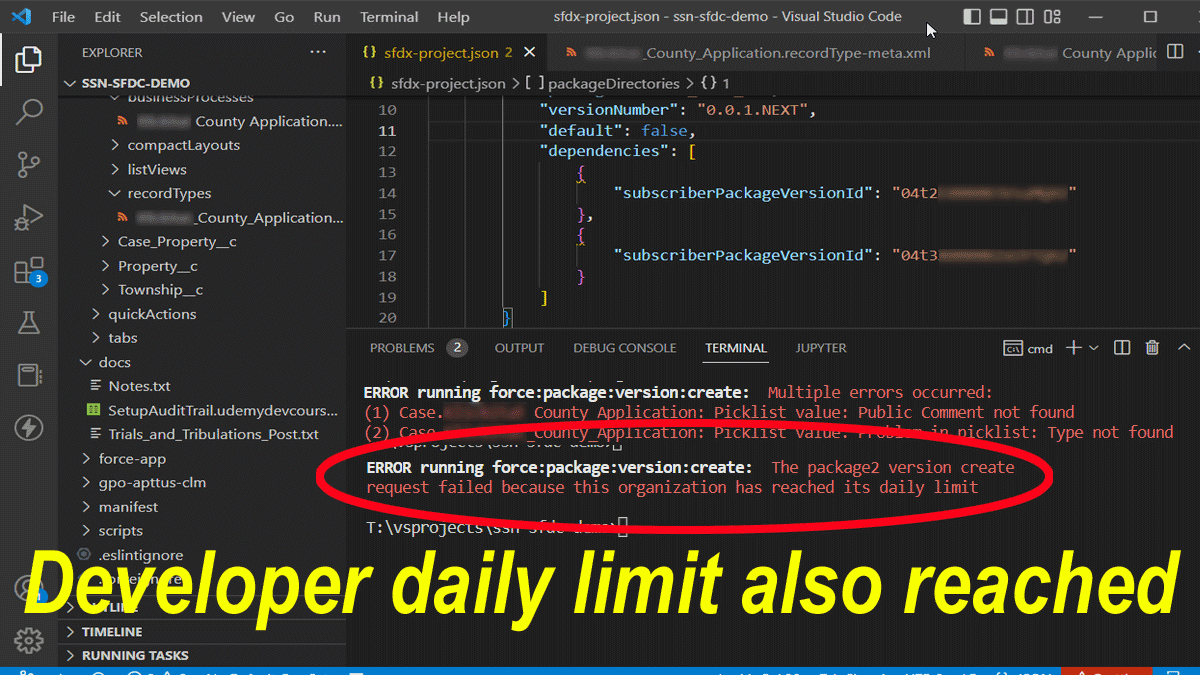
ERROR running force:package:version:create: The package2 version create request failed because this organization has reached its daily limit
Author has (also) reached its daily limit

In summary, to add a managed package as a dependency for an unlocked package:

With an org where the managed package is installed run the following:

sfdx force:package:installed:list -u [alias to org that has managed packaged installed]

Then add this to your sfdx-project.json under packageDirectories that contains your package:

"dependencies": [ { "subscriberPackageVersionId": "04tPACKAGEID" } ]

Where 04tPACKAGEID is the value returned from the CLI command.

If you found this interesting, please share.
© Scott S. Nelson