Webhook Screen

A quick and simple Salesforce webhook listener

Quick summary: How to set up your Salesforce org to listen for webhooks

Setting up your Salesforce org to listen for webhooks should be easy. Actually, it is easy, but it seems the steps are buried in different places like Horcruxes. I’m going to assemble them here, and if He-Who-Must-Not-Be-Named shows up, he can proof-read this for me.

So, we start with a simple Apex class. There are a bunch of examples of this. The easiest one for a quick start is in the Salesforce blog post “Quick Tip – Public RESTful Web Services on Force.com Sites.” Remember, it is a quick demo. Your final code should look like something between that and the example from the Salesforce Apex Hours video “Salesforce Integration using Webhooks.” My example is:

@RestResource(urlMapping='/hookin')
global class MyWebHookListner {
    @HttpGet
    global static String doGet() {
        return 'I am hooked';}
}

Now, the tricky part is that the Quick Tip blog has instructions and a screen shot of “just need to add MyService to the Enabled Apex Classes in the Site’s Public Access Settings,” followed by a wonderful example of a sample URL. Because I used Sites and Domains customizations once for a Trailhead exercise six years ago, the connection did not immediately click for me, nor the other steps. I will save you the tedium of reading all that I went through, which included pausing the aforementioned video several times to capture the exact steps and summarize them for you here.

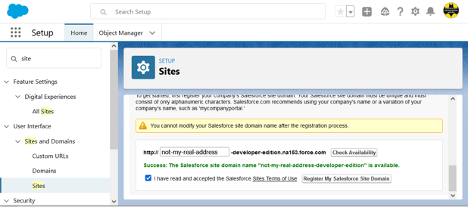
In Setup, search for “site” and select User Interface > Sites and Domains > Sites from the results. Create a site here if you don’t already have one (and if it is in production, make sure it is the URL you want).
Now, the tricky part is that the Quick Tip blog has instructions and a screen shot of “just need to add MyService to the Enabled Apex Classes in the Site’s Public Access Settings,” followed by a wonderful example of a sample URL. Because I used Sites and Domains customizations once for a Trailhead exercise six years ago, the connection did not immediately click for me, nor the other steps. I will save you the tedium of reading all that I went through, which included pausing the aforementioned video several times to capture the exact steps and summarize them for you here.

In Setup, search for “site” and select User Interface > Sites and Domains > Sites from the results. Create a site here if you don’t already have one (and if it is in production, make sure it is the URL you want).


If you created the domain just now, scroll down after clicking the Register My Salesforce Site Domain button and click the New button at the bottom. Fill in only the required fields (remember, this post title starts with “Quick and simple,” not “Safe and secure” … though you should do that on your own until I write that version), and Save (there may be a delay before the screen refreshes … be patient, as clicking it again will cause it to try to create another site and give you an error message). If you already had a site, click the site name in the list at the bottom of the page to get to Site Details page, specifically, the Public Access Settings button.

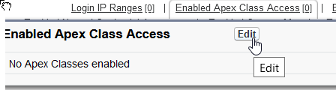
Here we want to find the Enabled Apex Class Access link and click it or the Edit button that pops up on hover:
And finally we get to the screen shown in the Salesforce blog post that lets the magic happen:
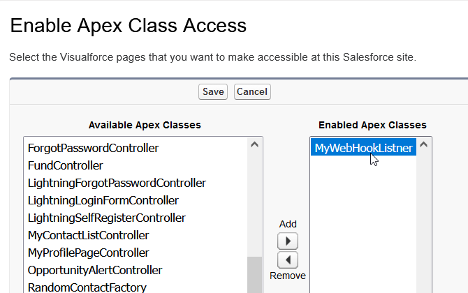
 

Add your class, save, and you may need to navigate again to the bottom of the Sites page and click the Activate button to activate the site you have created.

Now, take the site URL and add services/apexrest/[urlmapping] (the value used in you Apex code for urlMapping=) and go there. (The full URL will look something like “https://my-developer-edition.na9.force.com/services/apexrest/myservice,” with the bold text matching your site address and urlMapping, respectively.)

If all went well, you should see what ever nifty response you set as a return string, at which point you can get rid of the return string and do the serious stuff you want to do with your webhook. If not, drop me a line describing exactly what happened and I’ll try to figure out which of us skipped a step.

Also, for that security stuff I had said I wouldn’t cover, I do have to recommend that you:

  • Make sure that you handle all verbs and kill off the ones that aren’t expected.
  • Check the referrer for matching where you accept requests from.
  • Validate the format of the request matches what you expect.

Again, there may be more details in a future post. This one was just to make sure I didn’t have to go on another Horcrux quest.

To summarize all of above cheekiness into a set of steps:

  1. Your webhook class will be a RestResource.
  2. You must have an active Salesforce Site.
  3. You need to enable your RestResource Apex Class under Public Access Settings for Salesforce Sites.
  4. Your listener URL will be your Salesforce Site address/services/apexrest/urlMapping.
  5. You should secure the heck out of the class and processes before letting it access anything beyond a simple response string.

Originally published at Logic20/20 Insight

If you found this interesting, please share.

© Scott S. Nelson
Salesforce Certified Platform Developer I

Become a Salesforce Certified Platform App Builder

This is about my journey to pass the Platform App Builder certification exam. Yours will probably vary, and I hope this article is part of it.

For me, Platform App Builder is my third Salesforce certification. I passed the Administrator exam in 2018 and the Platform Developer I certification in 2019. 2020 I was too focused on expanding the Logic20/20 Salesforce Capabilities to study for an exam.

I have admitted in the past, and will repeat for clarity here, that much of my blogging is driven by having searchable notes on how I accomplished something so that when I need to do it again I can readily remind myself of what worked. My certification posts show a pattern that is working: Work with the tool, takes a course, take a diverse set of practice exams, then do it for real. Patterns are great for planning, though the devil is in the details, and I will get to those in just a moment.

Before getting to the good stuff, it is important to note that there is a key part of the pattern that is missing from those previous post, perhaps the most critical aspect: a genuine interest working with the tool that I want to be certified in. The value of this is clear from my first certification for the WebLogic Portal (RiP). I didn’t study for it at all, I just took the exam and passed (barely). I took the exam because it was required by the company that acquired the product. I had passionately worked with it for several years, and expected passing would be easy. It wasn’t, because certification exams are more about knowing things than doing things. Doing them does help to know them, just not as much as I would have thought. Anyway, it is that interest in doing that motivates me to acquire the knowing necessary for certification.

As a mentor, I frequently hear the same concern from people that are learning something new outside of their day-to-day work: It can be difficult remembering things by only reading or hearing about them. Learning exercises are often not enough as they are structured for success and the simple step-by-step instructions become a validation in following instructions rather than an acquisition of the knowledge necessary to perform the task. One thing I had done to rapidly accelerate my abilities in WebLogic Portal was to spend an hour each morning reading the community posts and answering questions. Not only questions I already knew the answer to, but also the ones I did not, by figuring it out, validating it, and then responding. Years later, I applied this technique again after becoming an Informatica Cloud Master. As many people know, solving real-world problems helps to lock in the learning. What I learned with WebLogic and Informatica is that there a plenty of real-world problems to solve beyond my own daily work.

In the case of Salesforce certifications, I can honestly say the best study technique was getting in to the Top 10 on the Trailhead Community Answers Leaderboard.

Beyond the community participation, the App Builder certification was the first one where I did not have frequent “ah ha!” moments while taking the trainings. The first (and last…I repeated it a day before the exam) training I took was the free one Salesforce offers on their Certification Days page. It is certainly worth taking for the pattern tips of how the exam questions are structured, such as (paraphrasing) “If there is a choice that suggests anything other than a declarative approach, it isn’t that one” and “Watch out for choices with multiple parts where most are correct. They must all be correct.”

I’m still a big fan of Udemy. I am also frugal, so I enrolled in Mike Wheeler’s Salesforce Platform App Builder Certification Course during one of the frequent sales. It’s a good course, though a lot of material is dated and it gets a little annoying to hear him complain about features that have long since been improved. The course does not include a practice exam, but I have found that courses that do have few more than the number of questions on the actual exam. The problem with that, is that there are way more questions available, and each exam consists of a random set of questions (within the ratios as described in the official study guide).

The App Builder Certification is one of the more popular ones. I think this is partly attributed to it being in the “Developer” category of certifications while requiring no knowledge of coding, and partly because Salesforce heavily emphasizes that coding isn’t necessary and should be avoided. Having been a consultant for a software vendor, I understand the value of declarative solutions because it is safer for regular vendor updates. I will also say that knowing nothing about the implications of technical choices can be a huge disadvantage even if everything is done declaratively. But I digress…

The practice exam package I went with from Udemy was Salesforce App Builder Practice Test [325 Questions] WINTER’22. There is great diversity in the questions, though there are several that are the same general question with subtle differences. They are spread through 5 timed tests. I didn’t do the actual math, but I think that while the total of all questions are in the correct exam ratio (23% Fundamentals, 17% UI, 22% Data Modeling, 28% Logic & Automation and 10% Deployment), I believe only 2 of the sets are correctly spread across topics. For me, reporting is a weak other (I generally delegate that work), and I found myself failing some of the practices where reporting questions were too heavily waited.

The value of practice exams is not memorizing the answers (don’t, because they change to avoid just that). The value is in learning weak points and shoring them up with some reading or Traihead modules.

As I mentioned, the App Builder is a popular certification, and there are a lot of other offerings on Udemy for practice exams. I made the mistake of buying one several months before using it and could not get a refund. I did get a refund on another that looked really good in the description but was outdated and contained several answers I knew were wrong. There are also several free video dumps on YouTube, and I found that many were also inaccurate, besides being the wrong medium for this type of studying (at least for me).

So, to summarize:

  • Get interested in what you are studying for
  • Attend one of the free Salesforce prep trainings (you also get a discount on your exam with the training!)
  • If you don’t get to build apps often at work, go help people on Trailhead to gain practical experience
  • Pick a good training course on Udemy when it is on sale and check it right away for quality and get a refund if it sucks
  • Pick practice exam set on Udemy with lots of questions and check it right away for quality and get a refund if it sucks
  • Follow me on Trailhead (not really necessary, but you may find some interesting answers)
If you found this interesting, please share.

© Scott S. Nelson

Is IT a cost center or profit center?

Quick summary: Transforming IT from a cost center to a profit center starts with more strategic business decisions concerning technology.

There are parts of IT that are costs, such as vendor-provided platforms, and this may confuse some into lumping all of IT into the cost center bucket. IT can (and should) be a profit center. Efficient IT can improve profit margins and growth. It is the business practices and decisions to treat IT as a cost center that eventually turn it into one.

Just as applications are useless without users, Enterprise IT that doesn’t provide value eventually won’t have an Enterprise to provide value for. What is often forgotten is that business capabilities are only as reliable as the processes that support them, including Enterprise IT processes. Many may believe that technology companies are the fastest and strongest in the market because they are more valuable, and I believe they are more valuable because they understand the value of technology and treat it as an investment rather than a cost of doing business.

Comparing Apple™ to apples

The difference in the nature of products fosters the confusion. A widget (or apple, to clarify the subheading) company that has a failure in the manufacturing process can go bankrupt, whereas a software company that has a defect can just issue a patch, ergo, issues with software are less important than issues with other enterprise activities. The misconception is that the software product is the same as the enterprise software that distributes it or the systems that communicate with customers. If that enterprise software fails for either the software company or the widget company, they are going to have a bad quarter (or worse). Tech companies know this, and it is why so many that run at a loss for a long time are later the biggest players. A deeper look into companies not considered as technology companies will show that the highly successful ones treat their Enterprise IT systems as if they were technology companies.

A clear indication of a company misunderstanding the value of their enterprise systems is the accumulation of technical debt. Technical debt is the result of Enterprise IT taking shortcuts to meet business objectives. For widget companies, or even widget service companies, this seems like a good trade off, because widgets are more important than enterprise systems to a widget-based company. Like any debt, technical debt grows exponentially when the principle is not paid down. True, that is not how math works, but it is how debt works, because the same attitude towards debt that focuses on interest payments and not the principle also tends to acquire more debt in other areas—or attempts to address the debt by restructuring it into new debt that is larger because there is a cost to the restructuring.

Getting interested in debt

The debt is a result of treating shareholders as Enterprise IT stakeholders. The business is the stakeholder, and while the shareholder may be a stakeholder in the business, it is the responsibility of the business to do what is best for shareholders by seeking ways to increase value in a sustainable manner. Enterprises that are spending money on paying loan interest are not giving that money back to the business and the shareholders. Eventually, this will erode share value.

The cost of technical debt is that expanding business capabilities takes longer or costs more or both. Unmanaged technical debt reduces quarterly earning capabilities, sometimes exponentially in relationship to value realized. Eventually, the debt becomes “real” enough that the business takes notice and invests in dealing with it…or an organization with a much lower level of technical debt takes over the company and enjoys the profits of applying their own solid, stable infrastructure to selling widgets in addition to their other successful enterprises.

“Lies, damned lies, and statistics”

Another perspective that leads to technical debt and higher IT costs is quarterly reporting. IT in the profit column puts a focus on ROI and a culture of seeking efficiency in providing new and improved features. If IT is in the cost column, cutting costs sounds good on the quarterly report, but what reduces IT spending in one quarter will increase the cost in a future quarter, both in maintenance and impact to further growth initiatives. Technical debt is less of a metaphor than an understanding of the true monetary value of IT.

Some may take the viewpoint that the need to update IT periodically is an argument for it to be considered a cost center. That need is (generally) driven by two things: the accumulation of technical debt making it cheaper to replace, or an improvement in the technology that makes an update even more profitable. To be fair, this misunderstanding is exacerbated because there are many initiatives that claim to be driven by the latter when the root motivation is the former.

Bottom line

Thinking of shareholders as IT stakeholders is a recipe for fragility. If technology is not improving profitability, then it either needs to be updated or discarded for the right technology. The only way to cut costs in the long term is to invest in reversing technical debt from previous quarters and reap the rewards in next quarters.


Originally published at https://logic2020.com/insight/it-cost-center-or-profit-center/

If you found this interesting, please share.

© Scott S. Nelson
Ready, fire, aim

Agile is not Ready, Fire, Aim

(Disclaimer: this article is not about what Agile is, the term is used only for blatant marketing purposes. Some principles were violated in the writing of this post)

A colleague of mine recently said something to the effect of “the goal of agile is faster delivery”.  This is a common misconception fostered by the improved velocity that agile teams can achieve in the context of enhancing software with new or improved features. The goal of agile is higher quality software, where quality is defined as meeting the intended functionality in a reliable manner. (lots of paraphrasing there, so please don’t flame me about accuracy). Another root of this misconception is that people who do not participate in agile projects (sometimes referred to as chickens) want agile to be about time-to-market (I’m working on a longer rant on that topic alone). Just like some people want agile to eliminate the need for planning and documentation, not be because these things are not critical (apologies for the double negative), but because they are tedious. They are certainly not mindful, because one focuses on the past and the other on the future, and we all want our features right now. Agile without planning and documentation leads to technical debt (something I grumbled about recently, with more to come).

Technical debt is the driver behind this particular rant, as I recently observed the creation of an equivalent jumbo mortgage with an early balloon payment due. In the same recent article linked earlier I mentioned how sometimes a platform migration is driven by a desire to get out of unacknowledged tech debt. In this instance, I witnessed the debt being incurred as a result of the migration. Specifically, the approach was taken to manually migrate data that was in immediate use while configuring the application without documentation in order to get into production as quickly as possible (the root cause of most tech debt). The idea was to migrate the rest of the data later. This migration, like many these days, was from one SaaS to another. The secret to a maintainable and extensible SaaS application is including flex fields in the data model. These are fields that have no pre-defined purpose so that customers can use them for customization and the vendor can avoid the hairball that results from customizing for each customer. The downside to this data model is that if the customer changes default labels and makes heavy use of the flex fields without documenting all of these changes, the data migration effort increases several-fold.

So, here is a real-world example of the impact of technical debt in a compressed timeline that is easy to follow: Short cuts were taken to quickly “realize value” from a new platform, and then to fully taken advantage of the platform subsequent efforts are increased, resulting in a much higher total cost and longer timeline to completion to get that short term win. None of this is the result of bad people or malicious intent, in fact, quite the opposite. It is the result of a “modern” business culture that has evolved to focus on quarterly earnings. It also explains why businesses that really want to innovate either do so before their IPO or go private to get back on track. It’s not because software can’t be done right in a standard corporate structure, but that “Continuous attention to technical excellence and good design enhances agility”.

If you found this interesting, please share.

© Scott S. Nelson
IT Design

(Some) Best Practices in Design

Note: This is far from an exhaustive list, and will be updated occasionally to reflect that.

Design First

Always design first. Even if it is an agile project with an aggressive timeline, a clear understanding of what your solution will look like and the steps to get there will make the path easier to get to. Designing first is the opportunity to think through what you will be doing and recognize potential issues in advance. Often when design issues show up late they are dealt with as code flaws rather than design flaws, taking longer to correct and often leaving the design issue in the “fixed” result.

When I can recall the exact wording and attribution I will update this post…meanwhile, not defining an architecture is an architecture. Some refer to it as a Big Ball of Mud. I particularly like Gregor Hohpe’s many takes on this choice. Here is a link to an older-but-still-accurate blog post of his.

Developers need to Design, too

Your design can be as simple as stubbing out all of your classes before developing them. This way, issues that were missed during the design phase are more likely to be discovered earlier, before they become harder to fix.

Test-Driven Development is another approach to catch issues early on.

Insist on Design Review

Have a technical lead or peer review your design. The additional perspective is always helpful, either by validating that your approach is sound or questioning choices and reviewing options found by a fresh set of eyes.

Environment Variables

Environment variables should be maintained in the environment. Placing these variables in components where they must be updated between environments reduces the value of such variables and increases the chance of errors when migrating deployments between environments.

Balance Early Adoption with Out-of-Date

Going first in a presentation is brave. Being first to apply a new technology in an enterprise is always risky, and those risks must be seriously weighed beyond the “cool factor” of being an early adopter. Once you have committed to early adoption, mitigate risk with thorough testing and following any active communities taking the same journey.

Because of the frequent and rapid changes in technology, the familiar approach is not always the safest. Libraries, functions, features and patterns currently in use at your enterprise may be heading toward deprecation and retirement. With vendor products, especially cloud platforms, a newer, better approach could be available that is solid and well-tested (depending on the vendor, YMMV). Always check for newer alternatives before committing to a solution, and weigh the alternatives for fit both from a functional perspective and maintenance implications. And…

Don’t Trust, Verify

Vendor claims are written by the marketing team, not the development or support teams. If a vendor states that Product X provides feature Y, validate that it does and that it does it in a way that supports your design before committing to it.

DevOps

Yes, DevOps is a category unto itself, and it also needs to be considered during the design phase. Retrofitting DevOps practices is often difficult. For greenfield projects, prepare a detailed recommendation on the benefits of DevOps for the application and the steps necessary to implement and maintain. For enhancement projects, review the technology landscape for potential and recommend accordingly.

Test Automation Design

Not all applications are the same, so using the same tools and patterns for all applications won’t work. That isn’t to say they can’t be reused across applications. What is important is not to assume fit for purpose. At a minimum, review the current state of the are for the tools you are familiar with, who their competitors are, and then try things yourself before believing any hype. This review should be repeated regularly once the test stack is designed to maintain relevance.

If you found this interesting, please share.

© Scott S. Nelson