Yet Another Tech Debt Post

Quick summary: Technical debt is the elephant in the room … the same elephant that the blind men were curious about. Understand how perspective contributes to and can resolve tech debt.

Logic20/20 has been involved in many platform migrations and technology refreshes. While there are myriad reasons to make such a major shift, the three key drivers are:

  • Gaining new capabilities
  • Increasing time to market
  • Reducing costs

Most other reasons will fit into one of those three, and usually it is more than just one of the three. All three are valid and valuable reasons to commit what is usually a large amount of resources to achieve. What is seldom acknowledged is that the initial motivation for the expense is to deal with technical debt.

Boom. Yes, that is a big statement. Let me unpack it a bit. Most new capabilities can be added through adapters or integration. Time to market can be severely hampered by technical debt, as can the costs associated with development and maintenance. That isn’t to say that upgrades and technology shifts aren’t necessary, only that the tipping point frequently comes from the accumulation of technical debt.

Once the transition to a new platform (be it an upgrade or vendor change) is complete, what follows depends on whether the influence of technical debt was acknowledged as part of the effort. Organizations that utilize processes, policies, and governance to manage technical debt can find that their ROI from the project will more than justify the expense. Those that do not recognize the contribution of technical debt to the problems with the old way of doing things and believe the issues were only within the platform will find that they will be ready for another migration in as little as one year.

The thing about technical debt is that it is not always recognized because of the different perspectives that result in its accumulation. I think of these as WhatWhy, and How. My experience is that the order of how these perspectives are realized determines the organization’s maturity in relation to managing technical debt. It is when they are recognized in the reverse order that it takes longer to reach a point where the organization is managing technical debt.
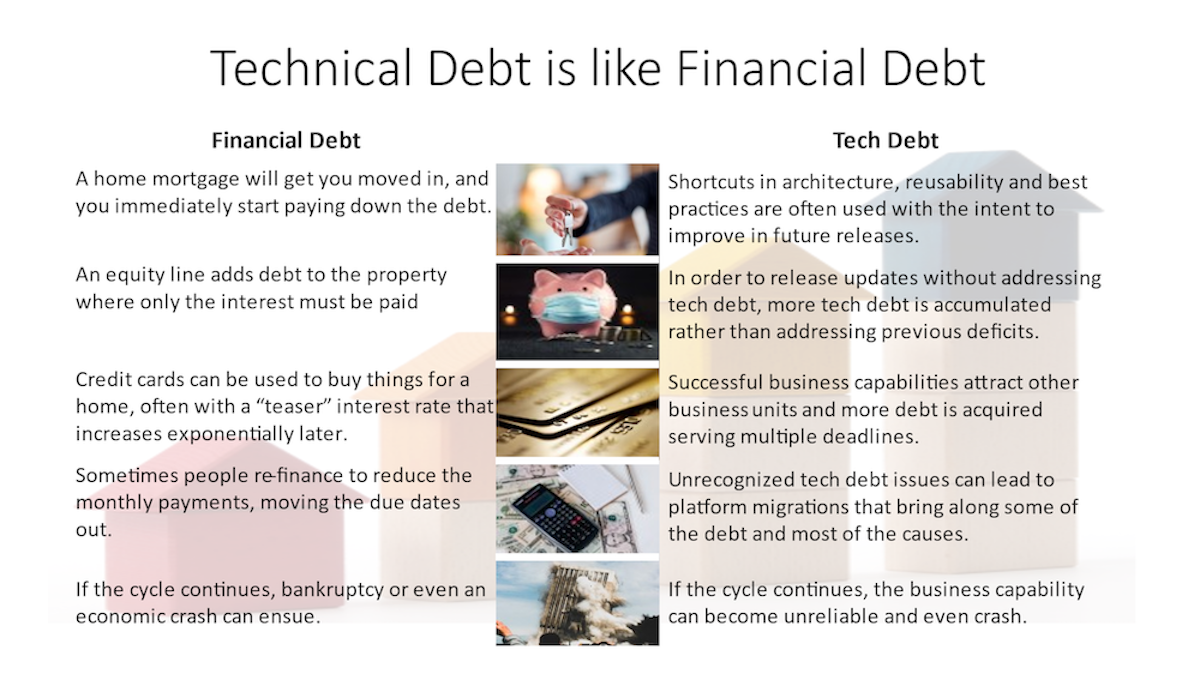
How is a technical aspect. It is the use of architecture, design, and implementation solutions that focused on the immediate need over the long-term solutions. At the time the decisions are made that lead to technical debt, the technical team usually knows it is happening and has hopes (if not actual expectations) to address the debt in later releases.

Why is a business problem, and is also more a series of questions than a statement. Was the initial debt incurred by informed decisions? Is the increasing debt the result of planned obsolescence or not knowing the impact? Are they even aware that their drive for business capabilities resulted in technical debt? The diagram at the end of Martin Fowler’s TechnicalDebtQuadrant post is the clearest representation of what leads to technical debt. Frequently the types of conversations necessary to make informed decisions don’t happen because technology and business make assumptions about viewpoints that are generally inaccurate. Communication is always a key factor to enterprise success.

What is a universal, once it is recognized either by the How or the Why: It is architecture and design issues that impede progress through time spent on maintenance and work-arounds. The How cannot change the What unless there is an important Why. In other words, the debt will not be reduced by technical teams unless there is a good reason for the business to pay for it.

The first step is reducing or eliminating the accumulation of technical debt. The second step is to determine how much focu$ will be dedicated to each release to reduce the technical debt. In most cases, this should be a gradual process of adopting new patterns and spending some time in each release refactoring what is related to the release. In some cases, the impact is so pervasive that either an entire release needs to be focused on refactoring or one team needs to be dedicated to it for one or more releases until is manageable again. Whereas most technical debt has a common cause, the path out of technical debt needs to be tailored to the enterprise and the system to be successful.


Originally publihsed at https://www.logic2020.com/insight/tactical/technical-debt-what-why-and-how
If you found this interesting, please share.

© Scott S. Nelson
Select Query in Workbench

How to re-assign Salesforce object ownership in bulk

Here is a question I see frequently in the Trailhead Community: How do you re-assign the ownership of objects in bulk? I’m sure there is an app to make this easier, and I suggest you look in the AppExchange if the policy for your org is to use apps first. And I know there are other solutions, this is just one that I find quick and easy because I don’t have to give it too much thought.

Accounts before Owner Change

First: Always try it in a sandbox first and test the results before doing it in production.

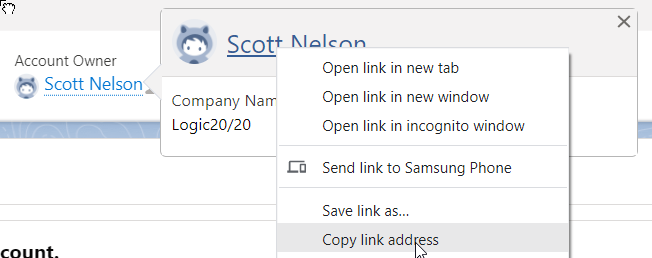
Second first, locate the user id of the person who’s object owners ship you want to change from. From their user page (or just copying the link), grab the object ID from the URL.

Find Object Owner

Copy Object ID
Copy Object ID

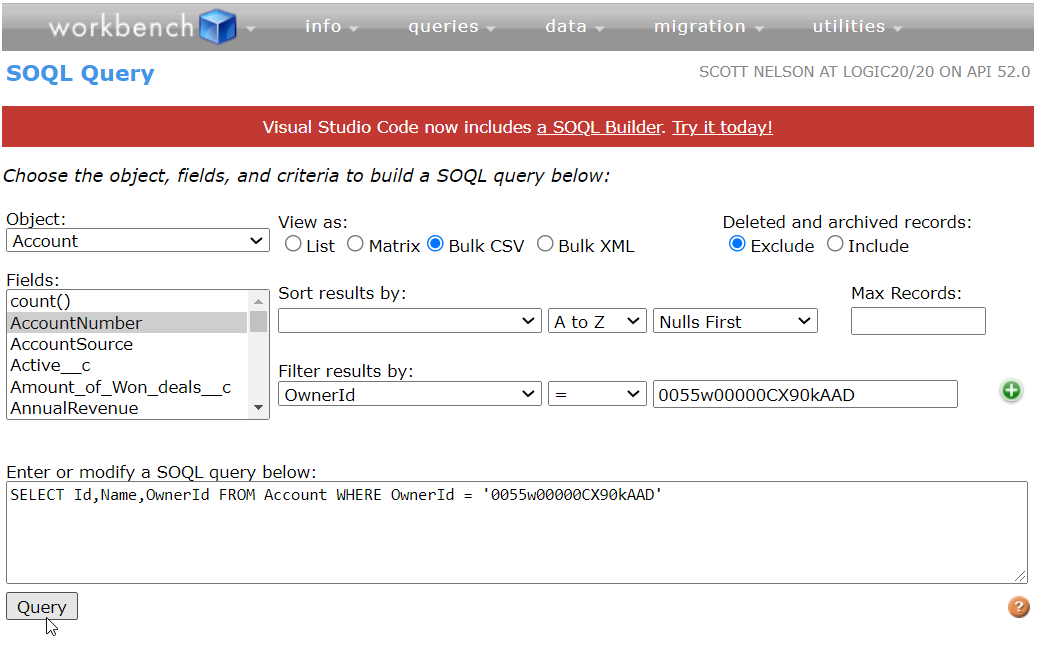
Now open Salesforce Workbench in another tab, login and navigate to Queries > SOQL queries. If you are adept at SOQL, create a query to pull all of the object you want to re-assign based on the user id. If you are not comfortable writing your own SOQL or just feeling lazy, use Workbench to help create the query:

Select Query in Workbench

The key values you want are the object ID and the owner ID, though adding a Name field to check the values can be helpful. Be sure to select View as Bulk CSV then run the query. Save the resulting file. I recommend naming it something that is meaningful to you rather than accepting the long string produced by default. Open in your favorite CSV editor to see the object and owner ids.

Next, get the user ID of the new owner(s) the same way you did for the current owner. In the CSV file, change the OwnerId value as desired.

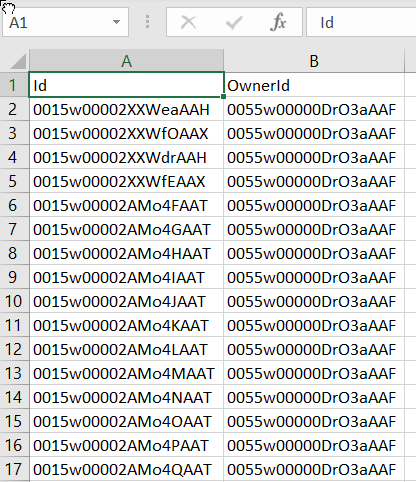
For safety reasons, delete all columns from the csv file except Id and OwnerId, then save it with a different name as a CSV file.

Object and Owner IDs only

Back in Workbench, go to Data > Update. Select the object type and click the Choose File button and select the file you just created with the new OwnerId(s), then click Next.

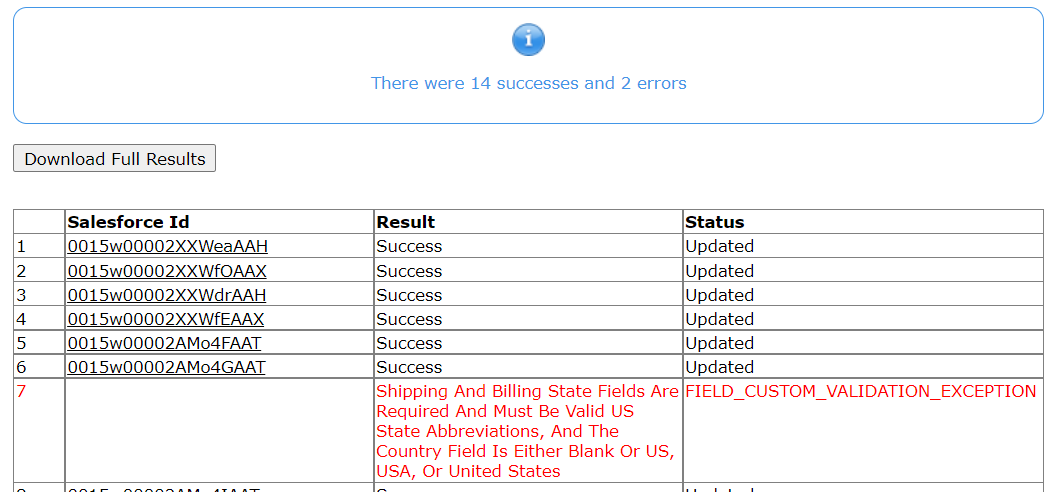
On the mapping screen the values should already be mapped. Check that only the ID and OwnerId are mapped and click the Map Fields button. If there are many records, check the “Process records asynchronously via Bulk API” option on the resulting page then Confirm Update. Note that if rules were changed since the records were created you may have errors that will require fixing the records before they can be updated.

Could happen if rules changed since created

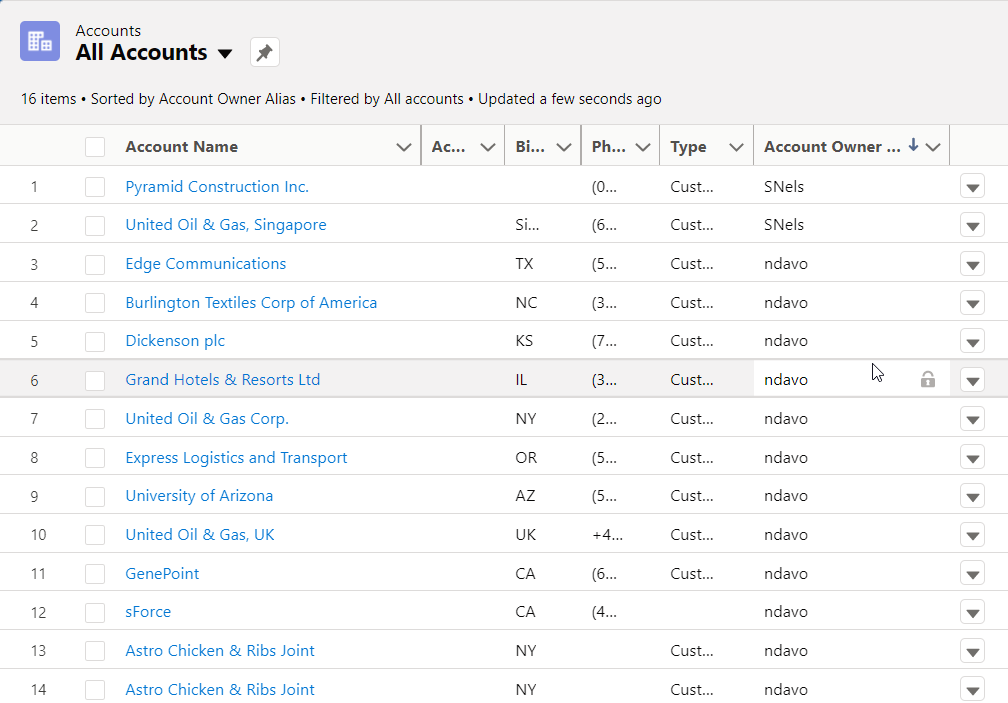
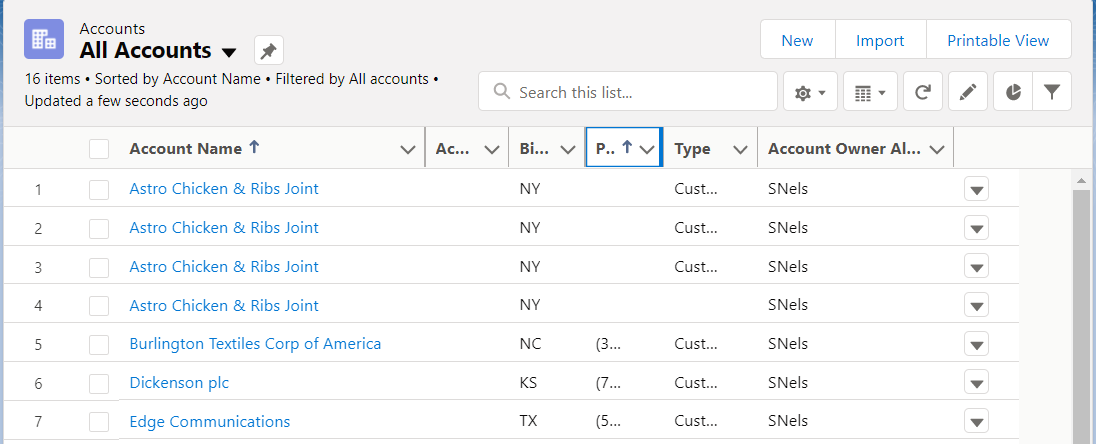
And in list view:

After Owner Change

If you found this interesting, please share.

© Scott S. Nelson

Random Data post at Logic20/20

Quick summary: Proven successful approaches to generating random test data in JMeter as part of a more complex API testing framework

Random data prevents optimized libraries from caching requests and displaying artificially high performance. It is also useful to test the range of accepted values to ensure that the full range is supported. In addition, random data can help with building negative test cases, which are important both for exercising functionality and for determining whether negative test cases result in performance impacts (which are also a security risk). There are many ways to create random data, and this article provides examples of some approaches I have used with consistently positive results as part of a more complex API testing framework.

Apache functions

There are several functions documented on the Apache site. I find that I need to look beyond the documentation for good examples, and you will need to look beyond this short article for more than one, though this is one I use often: ${__RandomString([length],[characters], [variableName])}:

${__RandomString(${__Random(3,20)},ABCDEFGHIJKLMNOPQRSTUVWXYZabcdefghijklmnopqrstuvwxyz,
              notes.saveSessionNotes.myOrderSessionApi)}

Using JSR223 Samplers

JSR223 Samplers are great for taking advantage of the efficiency of the Groovy language in JMeter. There are two types of random data that are well suited for JSR223 Sampler generation. One is generic data, such as numbers, dates, and alpha-numeric characters with an easily defined pattern. The other is a small sample of specific values that can be used randomly.

The static data stored in the JSR223 Sampler should be as realistic as possible. Extracting the data from a production database copy using a query such as

SELECT DISTINCT [FIELD_NAME] from [SCHEMA.TABLE]

is the best way to get realistic and valid values. In cases where an empty string as input will return null as output, consideration must be given to the impact of skipping the null inputs versus using assertions that need to be very complex in order to handle the nulls dynamically.

Random dates

The example below demonstrates an approach to extract the difference in days between the earliest and latest date, then randomly select a number in that range of days and deduct it from the latest date to create a random test value (in this case for a date of birth):

Date  todayDob  = new Date();
Date  bottomDate = Date.parse('yyyyMMdd', '19010101');
Int   diffDays  = todayDob.minus(bottomDate);
Int   rndDiff   = org.apache.commons.lang3.RandomUtils.nextInt(0, diffDays);
Date  randDob   = todayDob.minus(rndDiff);
vars.put('myApiPersist.dob',randDob.format( 'yyyy-MM-dd' ));

Random strings from list

An object array is easier to read and maintain for simple arrays.

String[] empStatuses  = ['Full time student', 'Unemployed', 'Retired',
                       'Employed','Part time student','Unspecified'];
int      empStatusIdx = org.apache.commons.lang3.RandomUtils.nextInt(0,
                        empStatuses.size());
vars.put(‘myApiPersist.employmentStatus', empStatuses[empStatusIdx]);

In the example above, note that org.apache.commons.lang3.RandomUtils is used instead of the Groovy Random class because of how Random is not actually random and can easily lead to clashes across threads. (There are other functions and approaches as well, and I tend to re-use previous code until a compelling reason to change occurs).

For sets of very small lists, using a random number and the modulus operator is more efficient if the random number is already being generated for another value, as in this example:

String[] patGender = ['M', 'F'];
vars.put(‘myApiPersist.gender', patGender[(int)todayDob.getTime() % 2]);

Two-dimensional arrays

2D arrays are necessary when values must be used in pairs to be valid. For those unfamiliar with working with multi-dimensional arrays, here is an example:

String[][] nearestLocation = [["Don't know","UNK"],["SoCal","42035005"],
                       ["None with 100 miles","OTH"],
                       ["Midwest","20430005"],
                          ["Virtual","ASKU"],
                          ["America South","38628009"]];
int      nearestLocationIdx = org.apache.commons.lang3.RandomUtils.nextInt(0,
                            nearestLocation.size());
vars.put(‘myApiPersist.sexualOrientation', nearestLocation[nearestLocationIdx][0]);
vars.put(‘myApiPersist.sexualOrientationCode', nearestLocation[nearestLocationIdx][1]);

Maps

Maps are an alternative to the 2D array. Here is an example from a file upload API test:

def fileSize = [1,5,10,20];
def extensionAndMimeType = [tif: 'image/tiff', pdf: 'application/pdf', jpg: 'image/jpeg', docx: 'application/vnd.openxmlformats-officedocument.wordprocessingml.document'];
def extensions = extensionAndMimeType.collect{entry -> entry.key};
String filePrefix = fileSize.get(java.util.concurrent.ThreadLocalRandom.current().nextInt(0, fileSize.size()));
String fileExtension = extensions.get(java.util.concurrent.ThreadLocalRandom.current().nextInt(0, extensions.size()));
vars.put('session_file.name', String.format('%sMB_File.%s', filePrefix, fileExtension));
vars.put('mime.type', extensionAndMimeType.get(fileExtension));

Random keys from maps

Sometimes you only need the key from a map at certain points in your test. Rather than maintain two samplers, you can access just the keys.

def fileTypes 		= 	[ 'FileAttachment': 1, 'FileAttachmentOpaqueId': 1, 'ClinicalNote': 3, 'ClinicalNoteTemplate': 4, 'ExternalDocument': 5, 'FaxDocument': 6, 'Multiple': 8, 'CCDABatch': 9 ];
def randomFileTypeKey = (fileTypes.keySet() as List).get(ThreadLocalRandom.current().nextInt(fileTypes.size())).toString();
OR:
def randomFileTypeValue = fileTypes.get((fileTypes.keySet() as List).get(ThreadLocalRandom.current().nextInt(fileTypes.size())).toString());
OR:
def randomFileTypeValue = fileTypes.get(randomFileTypeKey);

Lists

At a certain (arbitrary) level of complexity, a List implementation may be easier to maintain (or it may justify an exception to use a CSV file instead). Here is an example of a List of Lists being used to generate all possible combinations of three sets of health-related parameters:

List<List> testValues = [
  ["FEVER","COUGH","SORE_THROAT"], //v3SymptomsSet
  ["POSITIVE","NEGATIVE","PENDING"], //testResult
  ["YES","NO","INDICATED_BUT_UNAVAILABLE"]];//v2TestedStatus
List<List> patCOVID19ScreeningApiVars = [];//
List temp = [];
void generatePermutations(List<List> lists, List result, int depth, List current) {
    if (depth == lists.size()) {
       result.add(current);
        return;}
    for (int i = 0; i < lists.get(depth).size(); i++) {
        generatePermutations(lists, result, depth + 1, current + lists.get(depth).get(i));}
}
generatePermutations(testValues, patCOVID19ScreeningApiVars, 0, temp);
vars.putObject("patCOVID19ScreeningApiVars",patCOVID19ScreeningApiVars);
vars.put("patCOVID19ScreeningApiVars.Count", (patCOVID19ScreeningApiVars.size - 1).toString())
SampleResult.setIgnore();

Ctrl+C/Ctrl+V

There are some alternate ways to generate random values described in this Stack Overflow thread.

Some key considerations for options to generate a random number:

  1. java.util.Random does not generate true random values. A test in JMeter resulted in the same series of numbers every single run. This can increase the likelihood of clashes between threads.
  2. While org.apache.commons.lang3.RandomUtils is a wrapper around java.util.Random, it is (like most of the Apache Commons collection) a well-designed wrapper that results in values that are more random and tested to result in a different series of values on every test run.
  3. ThreadLocalRandom is recommended by some as more efficient. Given these efficiencies are measured in sub-milliseconds and that the Apache Commons is a more reliable collection than the java.util collection, the recommendation is to use RandomUtils.

Random conclusion

The failure of many API tests to catch defects prior to release is the limited inputs used to test them. Using random data in conjunction with iterative loops will help lower the amount of time spent patching production issues and leave more time for building business capabilities and value.


Originally published at https://www.logic2020.com/insight/tactical/generate-random-test-data-run-time-jmeter

If you found this interesting, please share.

© Scott S. Nelson
Package with Zipper

A simple Salesforce Package cheat sheet

As an IT consultant, I frequently change technologies and project roles. The frequent shift of focus is great for staying interested, engaged, and marketable. The downside is that many mental-muscle-memory tasks fade or never take root with long gaps between repetitions. One example is XSLT, which I have had to re-learn three times because it is not difficult to learn but only find I need it every five to seven years. Another example is various Linux commands, which I will post on my blog so that I can find them quickly when needed.

An additional technique I use, when available, is little cheats where the broad strokes are easy to remember and help prompt my memory for the details. The example of this I want to share today is creating Salesforce Unlocked Packages.

Before I start, it is important to understand that for a true package-management and -deployment strategy there is a lot more involved than just the ability to create a package. A package strategy requires thinking about how the org is used, who the stakeholders are, how many teams contribute to code and metadata within the org and how different their focuses are, and clear roadmap for an enterprise architecture with agreements on the direction and commitment to sustainable governance model. This post is just about being able to take something built in one org and being able to deploy it into another org as either a consulting starter, a demo set, or a shared feature.

In this example, I built a useful little Flow demo that guides CSRs in first searching for a contact before creating them to reduce duplication while following standard procedures for customer contact.

Flow module in action

It is a good component to keep handy as a starting point for clients that need a similar feature, so I want to be able to easily manage it in source control and distribute it to other orgs. Or I may want to share it with other developers for enhancements. In either case, I don’t work hands-on with packages to easily remember how to construct them. No fear! I do remember how to create unmanaged packages, which is a good start. However, it has been a while since I built this component, so looking at the list of flows does not make it clear to me what is what:

Call in contact flow package definition

I could guess, based on the names, but it is safer to be sure, so I go to the flow itself and look at the Properties to find the API Name:

Flow version properties

Components can have dependencies. Sometimes it is necessary to track them down and can require some test deployments to be sure all have been captured. In this case, the implementation is straight-forward, and Salesforce still finds a component that I had forgotten was involved:

Package component dependencies

Now that there is a package definition in the Salesforce org, I want to be able to move it to Github where I can work with it. The next step is to go to https://workbench.developerforce.com and navigate to Migration\Retrieve and select to extract the package by name:

Using Workbench to extract package

This will produce a zip file of the package components. To make these useful, set up a Visual Studio Code project for Salesforce (see if How to set up a Salesforce development environment you need help with this part). Now unzip the package into a folder name “unpackaged” at the same level as [PROJEC_PATH] and run the following command:

sf project convert mdapi --root-dir ../unpackaged --output-dir force-app

If the above paths were laid out correctly, you will see an output showing the components added to your project. Otherwise, check your folder layout and naming conventions and try again. At this point, it is useful to replace the default /manifest/package.xml with the one in the root of the unzipped package from Workbench (the following step assumes this). Finally, test that you can push the package contents to another org with:

sf project deploy start --target-org [USERNAME] --manifest ../[PROJECT_PATH]/manifest/package.xml --test-level RunLocalTests --wait 100

Once all components are deployed, you should see them in your org (they may not be enabled):

sf cli deployment
Package deployed

In this case, the flows require activation before they can be used. Post deployment steps will depend on your components.

Finally, add your project to source control. The project used in this article can be found at https://github.com/ssnsolutionist/Call-in-Contact-Flow-main.

Some of the steps above included commands from a cheat-sheet I maintain at https://github.com/ssnsolutionist/trailhead1/blob/master/sfdx-cli-common-commands.md

09-08-24 Revision Notes:
  1. The cheat sheet linked above is out of date. I’m working on it, mostly by having Perplexity.ai re-write them for me as I need them.
  2. Originally published as a Logic20/20 Insight article, the editors there later stripped out the screen shots, so publishing the full version here.
If you found this interesting, please share.

© Scott S. Nelson

Fixing SourceTree Credentials on Mac After Password Change

This happens every time I update my network password (as required every 60 days). It wasn’t until the third time that I made a note of what to do, and the fourth time where I posted it here so I can find it! I do not use a Mac regularly and freely admit I do not know the reason behind all of the steps (though I do for some, and won’t say which). I will say these steps worked consistently for the last 4 updates:

Log out of BitBucket from the browser

Do a full shut down of Source Tree

Back up and delete ~/Library/Application Support/SourceTree:

cd ~/Library/"Application Support"
mv SourceTree SourceTree.bak

Log in through the browser. Hopefully prompted with Captcha. May take a few tries (more consistent with Chrome than Safari).

Check something out through browser and enter new credentials when prompted. Remember to uncheck save credentials so it will use OAuth.

And yes, I know that this is unnecessary if using the command line. I like the Source Tree UI for managing conflicts and researching who made the change in the source that is currently driving me nuts 🙂

If you found this interesting, please share.

© Scott S. Nelson