From Agile to Fragile in 60 sprints

Feature image by Elisa Kennemer on Unsplash

The adoption of agile software development methodologies has been a necessary evolution to support the explosive demand for new and expanded capabilities.   There is no doubt that without the broad adoption of agile practices much of the growth in technology, and all of those aspects of everyday life that is driven by technology, simply would not have happened.

Still, too much of a good thing applies. Another old adage that comes to mind is “You can have it better, cheaper, faster. Pick any two”. Many organizations have insisted on all three. How did they do it? They sacrificed the documentation.

I’m not talking about saving shipping costs and trees by making manuals virtual, and then saving bandwidth by replacing the documents download with the install files with links to online documentation (which has its own issues in this world of massive M&A). I’m talking about all those wonderful references that development teams, sometimes backed by technical writers, produced so that others may pick up where they left off to maintain and enhance the final applications. Yes, that documentation.

Self-Documenting Code does not make a Self-Documenting Solution

While no one can honestly disagree with the value put forth in the Manifesto for Agile Software Development : “Working software over comprehensive documentation”, I also don’t think the intention was that documentation impedes working software.   Still, the manifesto has fed the meme (the original definition, not the funny GIFs) “Good code is self-documenting”. When I hear this, my response is “True; and knowing what code to read for a given issue or enhancement requires documentation”.  My response lacks the desired impact for two reasons: It doesn’t easily fit on a bumper sticker and it requires putting time and effort into a task that many people do not like to do.

The danger of little or no documentation is that the application becomes dependent on “tribal knowledge”. In a perfect enterprise, this is a dependable approach because employee turnover is low and when people do depart they always do so with adequate notice and thoroughly train their replacements. I have heard these enterprises exist, though I have never spent any time working with one of them.  I did, however, recently work with a business intelligence group where their entire ETL staff departed within a few weeks of each other after a few years of furiously building hundreds of data integrations in a dozen different business areas and then spent less than 9 hours in “knowledge transfer” sessions with my team who were tasked with keeping the lights on until a new crew was hired and trained. There was not one page of documentation at the start of the knowledge transfer and I have yet to find a line of documentation in any of the code.

I’m not advocating the need for waterfall-style detailed design documents. In some ways, those can be worse than no documentation because they are written before the code and configurations they are intended to describe are created and fail to be updated when the actual implementation deviates. In an agile world, writing the documentation after the implementation is a sound approach that will support the manifesto value of “Working software over comprehensive documentation” by being just enough documentation to facilitate maintaining the software in the future.

Meeting between the Lines

How much is just enough? That is going to vary by both application (and/or system) and enterprise. Some applications are so simple that documentation in the code to supplement the “self-documenting” style is sufficient. More complex solutions will need documentation to describe things from different aspects, and the number of aspects is effected by whether maintenance is done by the development team or a separate production support group. The litmus test for whether your documentation is adequate is to take a look at it from the perspective of someone who has never heard of your application and needs to be productive in maintaining or enhancing it in less than a day. If you have difficulty in adopting that point of view (many people do, and double as many developers), have someone outside your team review the documentation.

I find the following types of documents to be a minimum to ensure that a system can be properly managed once released to production:

  • Logical System Architecture
  • Physical System Architecture
  • Component Relation Diagrams
  • Deployment Procedures

Again, the level of detail and need for additional documentation is going to be driven by complexity and experience. Another factor is how common the relevant skills are. If the candidate pool for a particular platform or framework is shallow, more detail should be provided to act as springboard for people that may be learning the technology in general while diving into the particular implementation.

Yes, there are Exceptions

Conversely, some solutions are true one-offs that are filling a very specialized need that is unlikely to evolve and may have a short lifespan. These implementations only really need sufficient reference to migrate them to another environment or decommission them to free up resources while not negatively impacting other systems. I do caution you to really be sure that an application falls into this category before deciding to minimize the documentation.  What comes to my mind when I think of such decisions is massive amount of resources dedicated to dealing with two-digit years in 1999 to address applications that were not expected to still be in use when they were developed 10 or 20 years previously.

A Final Appeal

At the beginning I agreed with the manifesto value of working code prioritized over comprehensive documentations. In the days when most software life cycles began with tons of documentation and meetings to review the documents and meetings to review the results of the review, a great deal more beneficial build and test activities could have been done in that time instead. My experience in documenting the results of agile and other iterative processes toward the end of the development cycle and then reviewing that documentation with people outside the team is that design flaws are discovered when looking at the solution as a whole rather than the implications to individual stories in a sprint. The broader perspective that waterfall tried to create (and often failed since most waterfall documentation does not match the final implementation) can be achieved better, cheaper and faster when documenting at the end of the epic. In this one case, picking cheaper and faster yields better.

Documenting the fruits of your software and application implementation labors may not be the most exciting part of your team’s work, but the results of not documenting can become the most painful experience for those that follow…or your next gig!


Originally published at InfoWorld
If you found this interesting, please share.

© Scott S. Nelson

5 easy steps to install custom components in Salesforce Trailhead playground orgs

Salesforce Trailhead trainings are a great way to learn Salesforce. Some of the Hands-on Challenges require installing components. If you are using a Developer org to run these, the instructions are easy to follow. However, if you are using Trailhead Playground org, it is kind of a pain to install some components. There is a link thoughtfully provided by Salesforce for how to do this with eleven steps that I find a bit too time-consuming and confusing. I have found a slightly different approach that seems (at least to me) simpler. I will leave it to you decide which you prefer.

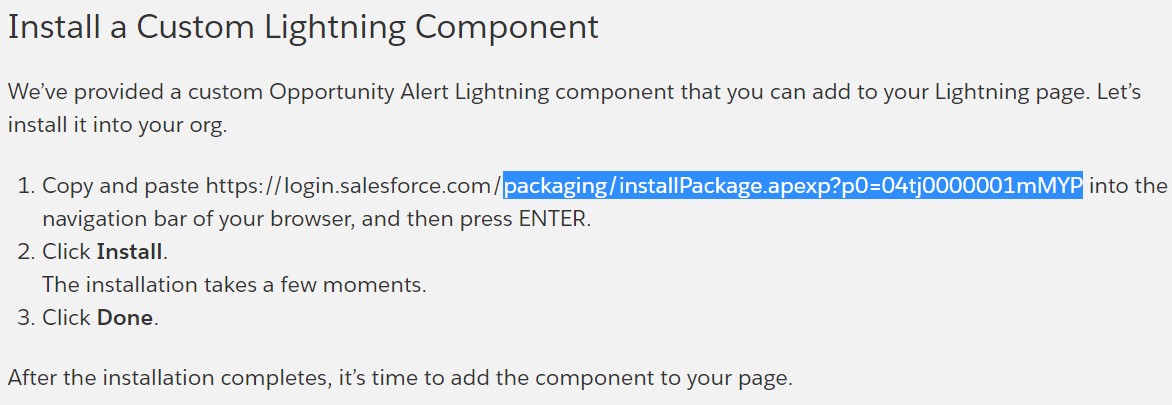
The instructions for installing the component (as in the screenshot below)will often be provided well before the challenge and the hint to avoid the frustration of trying to log into a Playground org when prompted by the standard component installation URL.

Example Trailehead Package Insturction
Example Trailhead Package Instruction

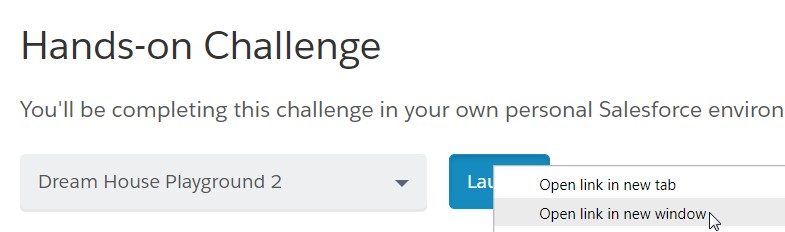
Step 1: Decide for yourself whether you will read through the full lesson or skip right to the challenge and when you get to the challenge, open your Trailhead Playground org in a new window by right-clicking on the Launch button (as pictured below).

Open your Trailhead Playground org in a new window by right-clicking on the Launch button

Step 2: Log in to your Trailhead Playground org.

Step 3: Go back to the lesson screen and copy the component installation URL without the domain, i.e., “packaging/installPackage.apexp?p0=04tj0000001mMYP”

Copy the component installation URL without the domain

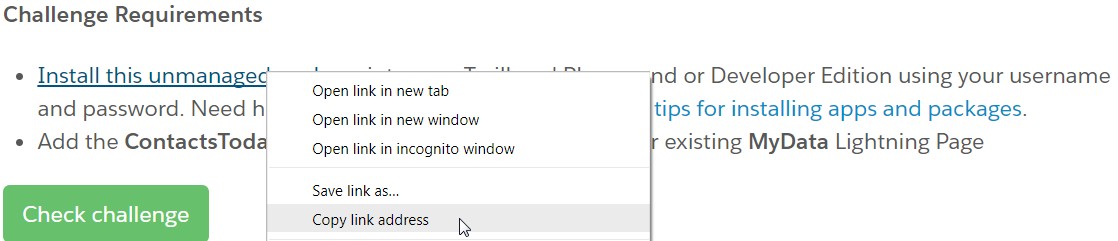
In some cases the installation instructions will have a link without the URL on the page. In this case, right-click on the link and copy the target to get the path, pasting it into a text editor to extract the portion following the domain.

Right-click on the link and copy the target to get the path

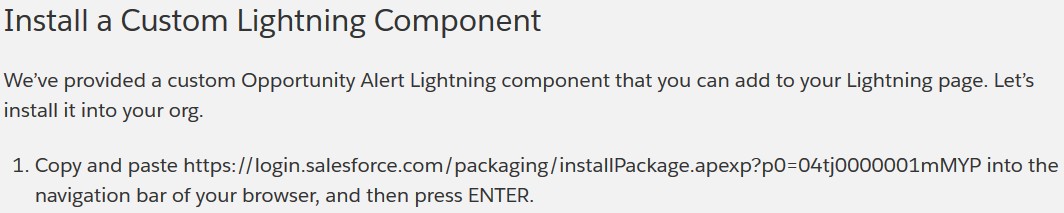
Step 4: With the package path in your clipboard, paste it after the domain name of your Playground in the window you have already logged into and press enter.

With the package path in your clipboard, paste it after the domain name of your Playground in the window you have already logged into and press enter.

Step 5: Once the installation screen will come up, and you can continue as instructed in the Trailhead lesson.

Once the installation screen will come up, and you can continue as instructed in the Trailhead lesson.

I have tested this on both Chrome and Firefox running in Windows 7. Your results may vary with a different combination of browsers and O/S.


Originally published at InfoWorld

01/27/2018 Update: The new Salesforce Trailhead UI may take you to the log in page. No worries. Copy the login URL and strip the characters before and including “startURL=”, past into https://www.urldecoder.org/, and strip all of the characters including and following the first “&”. to get the package URL.

If you found this interesting, please share.

© Scott S. Nelson

The Differences between IT Consultants and Contractors

I try to post original content. Sometimes that originality may only be in the presentation of the information, in which case I am attempting to provide (I hope) a clearer understanding or a simpler approach. Because of this personal rule of conduct, I first researched this topic to which I have thought and spoke about for quite some time and was very surprised at what I found. What is already out there on the subject of comparing contractor and consultant roles is sometimes contradictory and has some distinctions that I think are based on only thinking about individuals rather than encompassing companies that provide both services as well. Rather than argue the points others have made (which I don’t necessarily disagree with in certain, specific contexts) I will present my thoughts and experience and leave it to you if you wish to research further.

What’s the Difference?

In short, the basic difference between the two is simple: A contractor is an individual who possesses a specific skill set that they will utilize to your specification, where a consultant is an individual who has experience with developing a solution within a domain where you need assistance.

The basic difference is also inadequate to understanding which one you need for a given project (or aspect of a project) and how to work with them to your best advantage, so let’s dive a little deeper into the more subtle differences.

While you may work with both as individuals it is more common to work with them in groups. A group of consultants will be a team assembled on your behalf by a consulting company (AKA partner, group, professional services provider, etc.) and should be self-managing. A group of contractors may come from the same agency but will require management (which may also be contracted).

Consultants can help you define the problem and work with you to develop a plan to get from current state to target state.  Frequently they also perform and/or manage the tasks and deliverables of the plan. Consultants can direct contractors to execute to the plan, and will often provide those contractors as well.

Another difference is that for a contractor to be valuable, they must be deeply familiar with a specific aspect of the project, where consultants need only be familiar with the general domain of the project. One of the best reasons for engaging consultants is their proven ability to navigate through the unknown.

Working with Consultants vs. Contractors

One difference not included above is cost. There are many different fee structures for either, though they can all be broken down (for the sake of comparison) to cost per hour of effort. Consultants are almost always a higher hourly cost. The difference is usually reflected in the value provided during that time, meaning that you will get more benefit for each hour of consulting. They key word in the previous sentence is usually.

There are two common scenarios where the value is not always higher with consultants.  The first is when it is the wrong consultant.  The wrong consultant can be engaged for any number of reasons, and once this is determined than it should be corrected. This, however, is not the most common reason for missing out on the full value of a consultant.

The most common reason for not realizing the maximum value of a consultant or consulting team is working with them like they are contractors. Consultants should be actively involved at all levels of the project. During requirements definition they can provide their experience with what similar projects have missed including early on, and help determine prioritization through an understanding of the effort involved in delivering a requirement. Consultants will be able to apply experience in planning, knowing what tasks can be done in parallel to support timelines and where risks are most likely to occur along with mitigation approaches. Once the delivery phase has begun, consultants will recognize issues and opportunities during regular reviews that might go unnoticed by those who have not done similar projects in the past. Every consulting company I have worked with has a project management practice, and if it is a team of consultants engaged on a project it will generally yield the most value if the part of that team is a project manager who will, among other contributions, help the client to realize the maximum benefit of working with the consulting team.

Having one or more consultants on a project and then tasking them the same way as contractors is like rowing a power boat. It can still get from one place to another, but the boat is under-utilized, the journey will take more work than required, and it will not be nearly as much fun!

Which is Best for Your Project?

If your project involves technologies that your enterprise is already comfortably familiar with and you just need more hours in the day, contractors should fill the need nicely. You may be implementing a larger project where an isolated area is outside of your experience and a contractor can fill that gap and train your people on how to maintain it afterwards. Or the project you are working on is scaling out your technical landscape and you will need to keep on someone afterwards for maintenance, so contracting can be a “try before you buy” approach to determine the right candidate.

If there is a concern about whether the project is the right thing to do or the technologies are the right ones to use, consultants can bring experience and a fresh viewpoint to increase confidence. If a project will introduce more than one or two completely new aspects to the enterprise, engaging a consultant should certainly be considered. The nature of consulting makes them familiar and comfortable with the unknown. For many organizations, internal teams need to be more focused on the day-to-day operations and introducing change to the technical landscape can be better served by professionals for whom change is the day-to-day operation.

If you found this interesting, please share.

© Scott S. Nelson

Port Tunneling with Putty

Recently I had a situation where a combination of firewalls and load balancers prevented me from testing an application. Fortunately, an experienced server admin had a solution that I am sharing here: Use putty for port tunneling.

Create and save an SSH session for the host

Create Putty Session

Load the session, then go to Connection > SSH > Tunnels

Enter Putty Tunnel Details

Enter port and server info then click Add

Save Tunnel Connection

Click Open
Return to the Sessions and Save to store for future use
Now you can access the remote machine:port by using localhost:port, i.e., http://localhost:8080 will take you to http://anyhostname:8080 in the above examples.

This can also be done with BitVise Tunnelier (shown below for accessing MySQL):

BitVise SSH Tunneling
If you found this interesting, please share.

© Scott S. Nelson

Three Workflow Approaches with WebLogic Portal

This is a blast from the past originally published at Developer.com when they were still interested in portal development.  I came across it because I needed a reference to Nested Page Flows and couldn’t find one until I ran across a link to my own article. Deja dude. Anyway, here it is. One day I will clean up the mark up, but for now it is still useful for reference and so long as the link above works you can still see the clean version…

While the disclaimers usually start later, this article merits one up front: These are not the only solutions to creating workflows in WLP. For example, we’re not even going to touch on JSF, or consider the possibility of special considerations in a federated portal architecture. So don’t let yourself be limited by the scope of this article or author’s experiences, and prejudices. What we will examine is some solutions that are known to work and should give you enough of the basics to implement any set of workflow requirements on WLP.

Simple Page Flows

Page flows provide a very straight forward approach to creating a workflow. Using the built-in wizard will quickly generate your page flow controller with the default begin action. This default action is a simple action, which doesn’t do much for flow as all it does is forward to the generated index.jsp.

This is quickly enhanced by right-clicking on the begin action under the Actions folder in the page flow perspective and selecting Convert to a Method.

@Jpf.Action(forwards = { @Jpf.Forward(name = "default", path = "index.jsp") })
public Forward begin()
{
return new Forward("default");
}

Now you can begin adding workflow logic to your page flow. This approach is good for a simple process where the user will enter data in multiple forms and each submit does some level of processing on new data entered. You can even provide branching logic, forwarding to an action based on inputs. In either case, a single form bean in the page flow controller serves well to maintain the values, placing “frozen” values into hidden fields to maintain them from page to page and action to action.

Below is a series of action stubs that follow a simple workflow to create a web site user account:

/**
* Check if existing first last and email
* @param form userDataFormBean
* @return success if new user, error if existing user
*/
@Jpf.Action(forwards = { @Jpf.Forward(name = "success", path = "creatUserName.jsp"), @Jpf.Forward(name="error", path="index.jsp")
})
public Forward processUserNameAndEmail(userDataFormBean form)
{
Forward forward = new Forward("success");
return forward;
}

/**
* create user name and request address information
* @param form userDataFormBean
*/
@Jpf.Action(forwards = { @Jpf.Forward(name = "success", path = "getAddress.jsp")
})
public Forward createUserName(userDataFormBean form)
{
Forward forward = new Forward("success");
return forward;
}

/**
* Save the snail mail address and offer to subscribe
* @param form userDataFormBean
*/
@Jpf.Action(forwards = { @Jpf.Forward(name = "success", path = "subscribeNewsletter.jsp")
})
public Forward storeAddressInfo(userDataFormBean form)
{
Forward forward = new Forward("success");
return forward;
}

/**
* Save the subsription choice and send to summary page
* @param form userDataFormBean
*/
@Jpf.Action(forwards = { @Jpf.Forward(name = "success", path = "summaryPage.jsp")
})
public Forward offerSubscription(userDataFormBean form)
{
Forward forward = new Forward("success");
return forward;
}

What makes this simple is that each JSP uses the same form bean, with the action set to the next action. In a more robust implementation each action would also have an error page to forward to, which could easily be the JSP that submitted the information (such as processUserNameAndEmail does) with error messages. This example could be expanded with some simple branching; such as if the user already exists in the database the page flow action could forward to a password reminder page instead of simply going back to the index page.

Nested Page Flows

Nested page flows take planning a coordination between the originating and nested controllers.This makes them very useful when the work flow is predetermined and not expected to change much or often. In other words, the nested page flow approach is best suited to Waterfall projects where most (if not all) requirements are known prior to development.

Nested page flows allow passing control off to another controller while maintaining the state of the originating controller. This can be useful for branching logic or if you are creating multiple workflows that have the same set of steps as part of the flow. You can develop a page flow control that does the common steps, then call it from the controllers that deal with the parts of the workflow that vary. For instance, in our earlier simple page flow we could add a survey in the work flow before the subscription page to determine what types of subscriptions to offer. This survey workflow could also be presented to existing users at log in if their responses were out of date or when there was a new survey. In both the account creation scenario and the login scenario, the survey comes in at the middle of the process, so we want to be able to reuse the survey code without losing the state of either the enrollment or login workflow, so we call the survey flow as a nested flow.

If you know you are going to be calling a page flow as a nested flow at the beginning you can get the necessary annotations and action methods generated by checking the “Make this a nested page flow” option at the start of the page flow creation wizard. The two key ingredients to making a pageflow nested is in the controller annotation at the class declaration:

@Jpf.Controller(nested = true)
public class NestedPageFlowAController extends PageFlowController{

And the necessity to have an action with a forward that includes a return action:

@Jpf.Action(forwards = { @Jpf.Forward(name = "done", returnAction = "portlets_nestedPageFlowADone")})
protected Forward done() {return new Forward("done");}

The return action must be an action method that exists in the controller that called the nested controller. Calling the nested controller is simply a matter of having an action with a forward that resolves to the nested controller (or a method within the controller) like this:

@Jpf.Action(forwards = { @Jpf.Forward(name = "success", path = "subscribeNewsletter.jsp")})
public Forward portlets_nestedPageFlowADone(userDataFormBean form)
{return new Forward("success");}

As noted, this takes a good deal of planning up front. For a more Agile approach, let’s look at a new approach.

Event Flows

As far as the author knows, this is the first description of using events for this particular purpose. This is probably because the author doesn’t have as much time to read articles as write them, because it is a fairly intuitive leap to go from inter-portlet communication (a common use of portal events), to passing control back and forth between specialized controllers as well as loading hidden pages used only for special purposes in a workflow.

Events are a handy way of decoupling your controllers and actions. They allow you to move from one controller to another and back again with the only explicit relationship being to the event rather than the action. If you come up with a better way of handling an event or your workflow rules change, you can simply change how the event is handled rather changing all parts of the workflow.

Let’s say we are looking at a login workflow. When the user logs in, the first step would always be to check their credentials. From that point, there are many tasks we may want the user to do. It may be time for them to change their password, or there may be a message we want to show them based on some demographic information. None of these activities are mutually exclusive and could occur in any combination. We could use simple page flows or nested page flows to achieve this, but that would require tight coupling between the actions and/or controllers. Instead, we can fire an event based on an evaluation and send the user off to take a survey (for example). When they have completed the survey we may want them to see a bulletin or not. So rather than having the logic in the survey action as to where to send them to next, we can send them back to the initial action which will then evaluate whether they should just go to the landing page or somewhere else (such as our bulletin) first. The bulletin could either send them back to the same action after the user acknowledges receipt or forward them on to the landing page itself.

Accomplishing is fairly straight forward. For each page where you want to handle an event, create a .portlet file. While the portlet configuration must have some class defined where it would presumably start, once you add event handling to the configuration you have ultimate control over how to respond to that event. Let’s look at a simple example of how this works.

public Forward begin(userFromBean form)
{
PortletBackingContext pbc = PortletBackingContext.getPortletBackingContext(getRequest());;
int status = getStatus(form.getUserId());

switch(status)
{
case 0:
pbc.fireCustomEvent("callDisplayBulletin", form);
break;
case 1:
pbc.fireCustomEvent("callChangePassword", form);
break;
case 2:
pbc.fireCustomEvent("callPresentSurvey", form);
break;
}
return new Forward("default");
}

Our logic can go in any action, but for simplicity we will put it in the begin action:Since this action method always evaluates the users’ status, we can continue to send them back here and determine where to go next. If value of the status doesn’t have a case, we simply send them to the forward destination.

Each of the events has a portlet event handler registered to listen for it. The handlers can be in as many different portlet definitions as we want, allowing for reusing the methods in the same controller on different pages or be able to have several different controllers interact with each other through the event framework. Keeping our example simple, we will have the methods in one controller in a single portlet:

<netuix:portlet definitionLabel="eventBasedPageFlow" title="Event Based Page Flow">
<netuix:handleCustomEvent event="callDisplayBulletin" eventLabel="callDisplayBulletin"
fromSelfInstanceOnly="false" onlyIfDisplayed="false" sourceDefinitionWildcard="any">
<netuix:activatePage/>
<netuix:invokePageFlowAction action="callDisplayBulletin"/>
</netuix:handleCustomEvent>
<netuix:handleCustomEvent event="callChangePassword" eventLabel="callChangePassword"
fromSelfInstanceOnly="false" onlyIfDisplayed="false" sourceDefinitionWildcard="any">
<netuix:invokePageFlowAction action="changePassword"/>
</netuix:handleCustomEvent>
<netuix:handleCustomEvent event="callPresentSurvey" eventLabel="callPresentSurvey"
fromSelfInstanceOnly="false" onlyIfDisplayed="true" sourceDefinitionWildcard="any">
<netuix:activatePage/>
<netuix:invokePageFlowAction action="presentSurvey"/>
</netuix:handleCustomEvent>
<netuix:titlebar/>
<netuix:content>
<netuix:pageflowContent contentUri="/portlets/eventBasePageFlow/EventBasePageFlowController.jpf"/>
</netuix:content>
</netuix:portlet>

The above example is for the sake or brevity. It is far more likely that these events would be handled by multiple portlets either due to presentation considerations (such as going from a page full of portlets to a page with a single portlet) or logical separation of functionality (such as a survey controller, bulletin controller, etc.).

In addition to custom events, page flow actions are events that can also be listened for, allowing for the possibility of completely changing the functionality of action by listening for it and adding additional or new behaviors. The combinations are endless and can often be changed with only a minor configuration update or a single line of code. This simplicity is key to agile methodologies and provides developers with a rapid way to add functionality on an as needed basis.
Conclusion
Workflows are a common requirement for portals. While the examples in this article revolved around a simple registration and login process, they were chosen for their commonality. Employment applications, freight logistics, legal document creation, supply requisitioning, and financial transactions are other common workflows that are often required within a portal. Those that are straight-forward with little or no deviation are easily implemented with a simple page flow. Nested page flows provide a solution to complex workflows that need to interact and provide an opportunity for the reuse of common sub-flows when a project has well defined requirements. For a more agile approach, listening for and calling events provides a flexible, loosely-coupled way to call portlet methods within and between controllers without having to know all of the specifics what future requirements may be.

If you found this interesting, please share.

© Scott S. Nelson