Tips to Pass the Salesforce.com Administrator Certification Exam

I came late to Salesforce, only working with it for the last five years. The upside to that is that I don’t have a bunch of old habits that need to be unlearned in order to take full advantage if this awesome platform. The downside is that I am having to re-brand myself after having risen to the top of a technology space that was decimated by a combination of merger-madness and a vendor-victimization of the acquired customers. Salesforce will eventually fill that nixed niche for both the technologists like myself and the customers who need something that is flexible, scalable and has strong communities for both technical and business users. A big part of establishing oneself in the Salesforce space is certification, and the Salesforce Administrator certification is the foundation for anyone interested in professionally working in the field.

While I have over a hundred certifications, most are from third-party testers rather than the vendor because my experience of vendor certifications is that they require memorizing things that take less than a minute to find on Google and are only used two or three times in a career. And they cost a lot of money. However, they are also a way to stand out in a field where there are many people who rely entirely on search results for their understanding of how to get things done and believe that complex issues can be solved by only re-using the result of the first link that matches the immediate need.

About the Exam

The Salesforce Administrator is definitely one of the more honest certifications in that if you have been working regularly with the product for a couple of years you can pass the exam with little or no study. Not because there isn’t a bunch of those esoteric questions that only the admin-savant knows, but because the passing grade is only 65% and the credential verification site only shows that you passed and not by how many layers of teeth-skin you made it by. 65 is a fair percentage of what you would learn if you were doing the job correctly for some period of time or are adept at acquiring skills quickly through a combination of classroom learning and real life experience (which is how I passed, with much better than a 65% score).

The steps I will outline here are meant for whether you have real-life experience or not. Experience is not necessary to become certified in most technologies, which is why in many (other than Salesforce and a very few others) certification has become meaningless. It is, however, necessary to become good at applying the knowledge that is being certified. As is experience with other technologies and roles outside of technology.

Learning Paths

If you haven’t already, go sign up for a free Salesforce Developer account. As soon as you sign up, you will get an invitation to join Trailhead. You can join Trailhead without the free account, but you will want the free account to better grow your skills. Trailhead provides a whole lot of free training is well-designed and relevant to real-world requirements. At the start, I suggest completing a bunch of the beginner modules. They are easy to do and instructional, with many hands-on exercises that will get your confidence up. Confidence is key to test-taking. If you are working with Salesforce in the real world you can be prepared for the certification exam simply by completing all of the beginner and intermediate admin modules for Sales Cloud, providing you do them in a compressed period of time and test soon after completion.

Legitimate 3rd Party Prep

If you are one of those people who are really good test-takers and are interested in high scores regardless of how practical your knowledge is there are several free prep sites on the web. Here is a list of the ones I found fairly useful, even if some of the questions are more about impressing people on the knowledge of the site owner than in preparing for the exam:

https://www.exam-labs.com/vendor/Salesforce

https://www.proprofs.com/quiz-school/story.php?title=salesforce-administration-test-adm201

http://www.certifiedforce.com/sample-questions/administrator-quiz-1

https://www.udemy.com/free-salesforce-admin-certification-course-introduction/learn/v4/

https://www.salesforceben.com/salesforce-admin-practice-exam/

Personally, because of the number of questions that are not on the exam and are both esoteric and overly-clever (i.e., “tricky”), I found the above sites useful in building knowledge but not very helpful for confidence.

For me, the best resource for preparing for the exam was Udemy. There are a few free courses, and you can combine them will all of the above and have a good chance of passing. If you want to guarantee a pass, I suggest two courses.

The first is https://www.udemy.com/salesforce-certified-administrator-201-2017. I can’t say enough good things about this course. It is extremely well-designed and engagingly presented. It covers every aspect of the exam and provides practical and understandable demonstrations.

The second Udemy course isn’t really a course (IMO). It is https://www.udemy.com/salesforce-administrator-certification-practice-tests. There are three tests in the course that you can take as many times as you like and the review your wrong answers with both the correct answers and explanation why it is correct. If you are not in a rush, you can sign up for a Udemy account and then wait for one of the frequent sales they have and take the courses for under $15 each, a bargain considering Salesforce will charge you $20 bucks for one practice quiz.

Test Taking Tips

Finally, when the time for the exam comes, be prepared with a strategy. The practice tests should give you an idea of how much of the allotted time you personally will need. I have to variations of my certification exam strategy based on how much of that time is required.

If you find you use most of the allotted time in practice exams, when the real exam comes along take in four phases. In the first phase only answer the questions you immediately know the answer to going from first to last question. In the second phase, go through the unanswered questions as quickly as you can and check the review box for all those you don’t feel confident about. For the third phase, review all of the questions you check for review and take your time until you are confident you have either chosen the best answer or truly don’t know the answer. The final phase is to review the questions from start to finish until your time is down to the last minute.

If you generally finished quickly in the practice exams with a passing score then on exam day go through all of the questions in order and flag any that you are not 100% positive of. Then go back and review those questions and revise the answers where necessary. Finally, quickly go through all the questions again and double check yourself.


If you found this interesting, please share.

© Scott S. Nelson

Salesforce uncoded: the reality of code-free Salesforce communities | InfoWorld

Salesforce uncoded: the reality of code-free Salesforce communities | InfoWorld

My other blog is a publisher’s website 🙂

Note: The tag line “An interesting challenge achieved … but at what cost?” was added to the original post by the IDG editors and I’m not really sure why. I think that it is great how Salesforce has empowered the citizen developer to mash up components provided by the vendor and IT so that IT can focus their time only on the parts that really do need a customized solution. This leads to better custom solutions and greater use of the platform.

If you found this interesting, please share.

© Scott S. Nelson

How Salesforce Supports Citizen Development

Citizen development is really a responsible response to the dilemmas created by Shadow IT. Now that technology is available to those with minimal technical knowledge business users will implement solutions without the help of the IT department. The best thing IT can do about this is mentor the business users in ways that will support what business is going to do anyway in a way that will not lead to enterprise-level headaches. Salesforce is at the forefront in helping business and IT with this new paradigm.

The number of times I revised the title of this post is a sign of the times in technology. Those not steeped in the gray arts of technology may think that since computers process 1’s and 0’s that going from thought waves to software is a linear and clearly defined path. The more the technology evolves the less true that is. I started with the title of “How Salesforce Enables Citizen Development”, but a key premise of this post is that it is not a check box in the system administrator’s console, which the term “enables” insinuates. “Citizen Development with Salesforce” was considered and rejected because it has a tone that suggests that there is no longer a need for highly trained Salesforce administrators, architects and developers. Not only do I disagree with that premise, I more emphatically caution against the invalid assumption that such a void would result in cost savings. These nuances of title may seem like a lot of over-thinking except that as both a writer and reader I am all-too-aware of the tendency to base a fully formed opinion on the title alone.

I was recently asked to sum up the benefits of citizen development and came up with the following:

  • User-owned Solutions
  • Reduced IT Bottlenecks
  • Streamlined Process
  • Lower Costs to Deliver

Salesforce supports citizen development by providing a platform with capabilities that can be accessed and utilized with a minimum of training and experience. The unbridled optimist will look at the preceding sentence and imagine a world where every business user can build applications that are easy to use and will contribute to productivity at a lower cost.

Citizen Development Bumper Sticker Policies

The realist would (and should) take umbrage with the word “every”. Putting aside the variance in individual capabilities, there are other key factors that make “every business user” a dangerous assumption. Two key factors are time and inclination. It takes both to perform any one of the following critical tasks for a successful application:  Determine the full range of business requirements an application should address; analyze the variety of technical solutions and appropriately select the best fit for the requirements;  review the existing functionality within the organization for potential reuse and impact; train and support other users in the resulting application; and maintain proper data governance to ensure both adequate security and cost controls.

So, perhaps a better statement of how Salesforce supports citizen development would be “Salesforce provides the tools for an enterprise to enable business users to build applications with little or no IT support when proper governance processes are established and followed”. This phrase doesn’t fit on a bumper sticker as easily as “Clicks not code”. Perhaps “IT doesn’t go away. IT gets out of the way” almost fits, though.

The “lower cost to deliver” benefit is based on the streamlined process of citizen development, i.e., no need for business to create a full specification to hand off to IT for implementation since business will own the development. In an enterprise where the IT team is continuously backed up, this will lead to faster time to delivery as well. In cases where the scenario is simple or common enough to be configured in a generic manner, a great deal of time can be saved. However, this should not be confused with the false assumption that configuration over coding is inherently faster. Sometimes it is and sometimes it is not. Declarative programming must be provided in a way that is maintainable by the vendor and generic for the customer. For a skilled developer, custom development can be completed in far less time than it takes to configure a collection of generic options to something as simple as loop through a specific set of data looking for a specific output.

If it sounds like citizen development is a bad idea that is neither the case nor the intention. Application development is like raising a child… it takes a village with each member contributing their specialty at the best time and in the appropriate context. A governance group to provide guidelines, consider exceptions and enforce adherence; Architecture and security specialists to determine the best way to ensure compliance; Developers to provide reusable components when they are not readily available from the App Exchange; Trained Salesforce system administrators to enable appropriate permissions, configure necessary integrations, and manage production deployments.

In short, all of the roles that an organization following best practices for platform use will have in place anyway. On the one hand, supporting citizen development adds some additional tasks to those who support the platform. On the other hand, properly supported citizen development frees up platform support personnel to better focus on the tasks that most need their skills while improving relations between business and IT by enabling business to more self-supporting.

Originally published at InfoWorld

If you found this interesting, please share.

© Scott S. Nelson

Salesforce Community with Custom Objects in a Flow

Last year I wrote about Revisiting the Question of Build versus Buy for Web Portal Solutions, which was greatly inspired by the reduction in solid portal offerings that began about a decade ago. The dearth in offerings is a result of acquisitions by vendors who prefer that portals work only (or, at least, easily) with their own products. While I’m not a big fan of architectures that lead to vendor lock-in, there are situations where the portal is focused on exposing a certain view of a specific application and it is best if that is built by the same vendor as the application itself.  Case in point: Salesforce Community Cloud.

Salesforce has been rapidly improving their Community Cloud product with more features and easier management. I believe this is partly fueled by the demise of pure-play portals that can surface Salesforce functionality using the great Salesforce APIs (Liferay being the exception) and a smart move to increase Salesforce revenue while reducing customer costs for high API traffic. Whatever the drivers, I like where it is going. Though, like any technology on a rapid growth curve, there are some bumps along the way. One such bump is puzzling out all of the different permissions involved to provide various functionalities. Generally these bumps are easily overcome thanks to the active SFDC user community. Recently I ran across something that was not so easily solved and thought I would share it here.

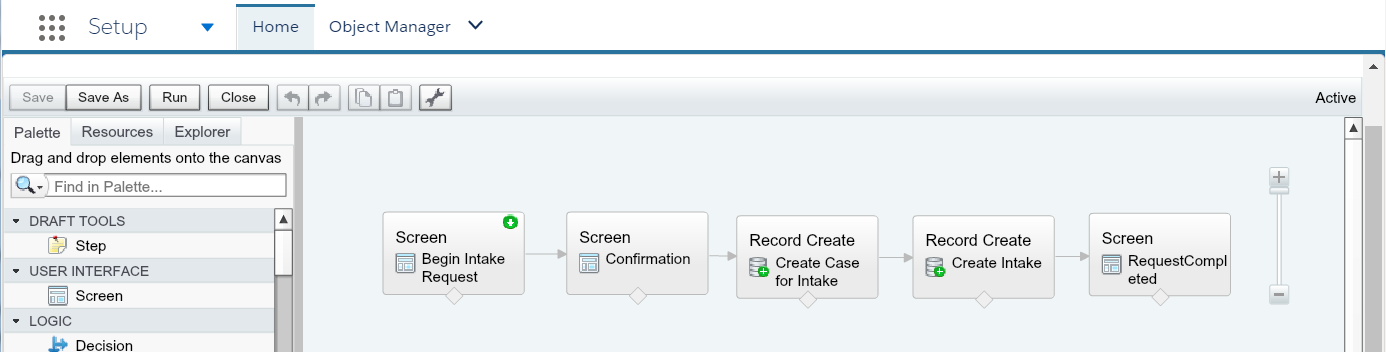
The requirement is to create a workflow that ties together the standard Case object with a custom object. The goal is to make the user experience of working with a long form created previously to support the custom object by breaking down the numerous fields into user-friendly chunks that will result in a Case being created along with the custom object as a related object. With the normal amount of “oops” and “darns”, I managed to put together a Visual Work Flow that would take the inputs and create the Case object and then the related custom object.

A Visual Work Flow to take inputs and create a Case object and related custom object

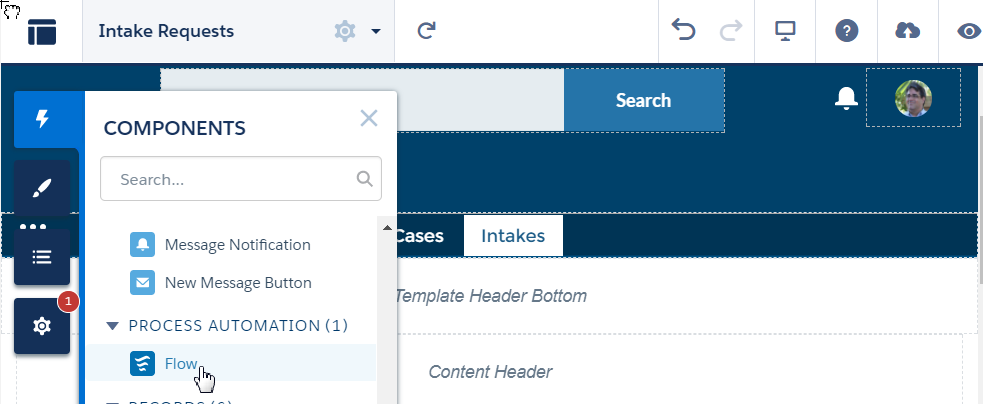
I then created a Community page in a community using the Lightning Community template Napili and placed a Flow component with the new workflow configured.

Adding a Visual Workflow to a Lightning Community

The first bump I hit was that the Case failed to be created, which I easily figured out from the various Salesforce user communities was because I was using the wrong ID for the contact (the User ID is different than the Contact ID for community users). Once this was fixed, I then found that the custom object was not being created. Back to the trusty community posts where I found the sage advice to grant access to the object to the profile referenced in the Community Builder Settings. Well, not so sage as in my haste I forgot that that fields only applies to “guest” users, i.e., users not logged in.

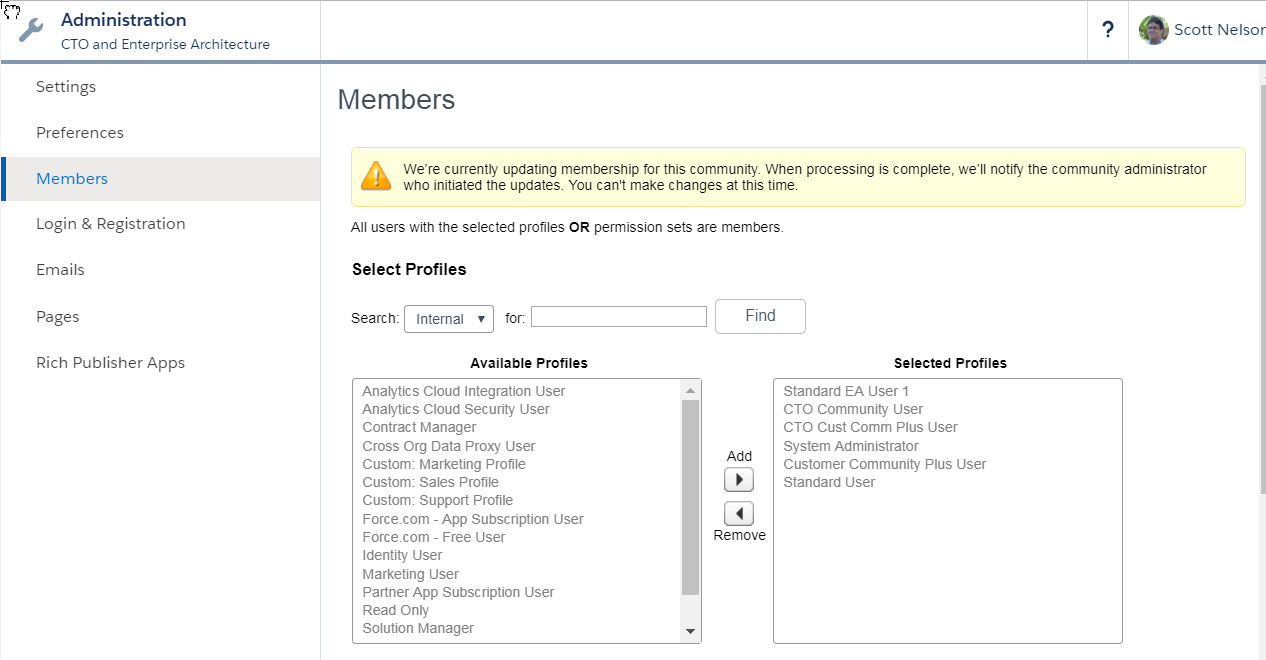
To make a very long story short, the default profile granted to customer community users did not have permission to access the object (even though, during creation, I granted necessary access to all profiles) and the default profile is read-only. The fix was to clone the default community user profile, grant that profile the necessary permissions, and then use that profile for my community users. Who then could not log in! Oh, yes, even though everything about the default profile was cloned, the new profile still needed to be granted access to the community using the Community Administration view.

Granting access to a new profile in the Community Administration view.

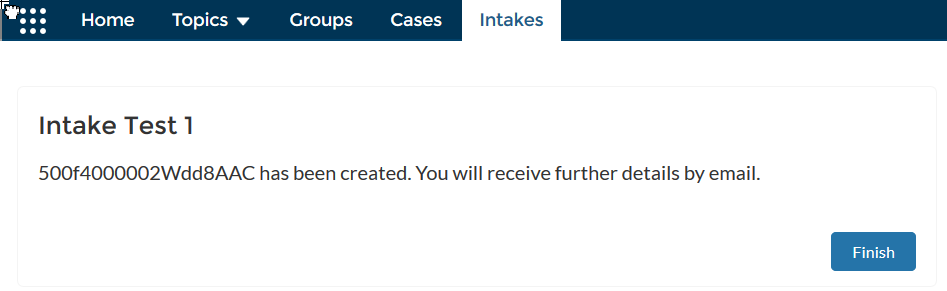
And, finally, the workflow could flow to the end.

Lightning Community Workflow Complete View

Originally published at InfoWorld

If you found this interesting, please share.

© Scott S. Nelson