I noted yesterday about Where to Put Your WebCenter Producer Connections that the process for making it an IDE connection still started in the Application panel. Now I know why. I added another portlet to the producer and it shows up in the IDE Connection resources but would not drag into the application. Leaving off a few hours of frustrated Googling, I eventually went to the connection in the Application resources and discovered that the Producer had to be refreshed there in order to make it available to the application. Other than a reference point, I don’t see the reason to even have in the IDE panel now that I see how it works.
Where to Put Your WebCenter Producer Connections
When creating a WSRP connection, the documentation says “For other methods of invoking the wizard, such as from the Resource Palette, see Section 1.6.2, “How Do I Access the Connection Wizards?” (64.2.1 How to Register a WSRP Portlet Producer) but in the case of WSRP producers, for both Resource Palette and Application Navigator, you invoke the wizard from the Application Navigator and then choose where the connection will be stored:

Why I Still Prefer Java to C#
While C# is a pretty robust language, the following production code would never get past any Java IDE I have ever used:
private void VerifyPrePopulate(string ReportQtr, string VerifyType)
{
    try
    {

    }
    catch (Exception ex)
    {
        lblErMsg.Text = "Error Message:" + ex.Message;
        lblErMsg.Visible = true;
    }
}
Cleaner Code with the PMD Eclipse Plug-in
Re-post from the original publication on December 4, 2008 at Developer.com.
Most developers like to write clean code. So why is so much code in the world messy? While there are many opinions about this, there are two contributing causes that very most everyone will agree on.
One of the reasons is that there is rarely enough time to write code as cleanly as we would like. Even when code starts clean, the continual refactoring from changing requirements, shifting dependencies and the inevitable bug fixes (often a result of the first two factors) leads to messy code just as surely as short deadlines and long hours make an organized person’s desk become littered with piles of unfiled papers and unfinished notes.
The other reason that is generally agreed on for code in the real world not being as clean as it starts out in our minds is because not everyone generally agrees with what clean code should look like. Some people are more certain that their version is cleaner than another, and there are people who hold different opinions with equal conviction. For example, which row the opening brace of a method belongs. An example where I’m fairly certain I am not the only person who has had endless email threads and inconclusive meetings about. The one, final answer will not be decided in our lifetime.
While the coding standards of an enterprise or project team may begin as a democratic process, they will not be useful as a benchmark until their definition evolves to a benevolent dictatorship (remember, we are discussing business, not government here). Once the standards are defined, a third reason for not meeting them comes into play, which is that there are usually more rules than most folks can memorize, or remember when the time pressure is on or when the rules of one project differ from those of another. For these causes of messy code, I have found PMD to be the best solution based on its flexibility and ease of use. The letters themselves do not really stand for anything. The creator(s) just thought they sounded good together. The PMD home page supplies “several “backronyms” to explain it.”
About PMD
The PMD home page describes the value of the project simply and concisely as something that scans Java source code for potential problems such as possible bugs, dead code, suboptimal code, overcomplicated expressions, and duplicate code.
PMD is more than just an Eclipse plug-in, in fact it is available as a plug-in for many IDEs. It can be run from a command line or as an ANT task. This makes it perfect for Agile projects as it can be integrated into the developer’s IDE and run as part of an automated build process. Even if you aren’t running automated scans at build time, making it part of your IDE will allow you to write cleaner code as a developer and to speed up code reviews as a reviewer.
Eclipse Plug-in Installation
While Google is a developers best friend (though I really miss DejaNews), for the more mature Eclipse plug-ins it pays to read the details of your Google search results. In the early days of Eclipse plug-ins, the use of the update manager was less prevalent. Most plug-ins at that time were made available as downloads. Many of the plug-in projects that have survived since those early days have since moved entirely to the Eclipse project’s preferred method of using the update manager. While this can be annoying to those of us who began using Eclipse in the early versions (especially when maintaining a portable tool kit), it is a much cleaner way for plug-in projects to publish their wares and make it easier for the user to get the correct version for their workspace. I mention this because while preparing for this article my Google search found the original download site at http://sourceforge.net/projects/pmd-eclipse. Even though it wasn’t the highest ranked, it did come in third and the habit to want a download rather than an update manager URL is hard to break. Just before downloading the zip file, I noticed that site was last updated in 2005. Had I installed that version I would have then spent part of my afternoon cleaning up the mess of my highly-personalized workbench.
The currently maintained site is at http://pmd.sourceforge.net/integrations.html, where you will find the update manager URL of http://pmd.sf.net/eclipse. As a refresher from the Building the Perfect Portable Eclipse Workbench article, here are the steps to install PMD through the update manager:
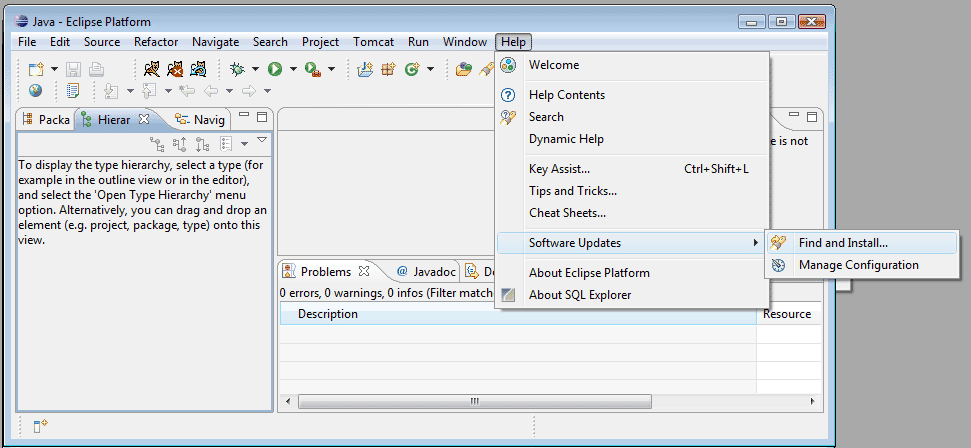
Figure 1: Access the Update Manager from HelpSoftware UpdatesFind and Install

Figure 2: Select Search for new features to install in the Update Manager Options

Figure 3: Add the PMD URL to the Site List
From this point, the standard “Next, Next, Next” steps can be easily followed. Upon success, you will have a new perspective in your workbench:

Figure 4: The PMD Perspective
If you happen to use the PHP version of Eclipse you will need to accept the restart Eclipse option or be annoyed by prompts telling you that your workspace is a mess.
Checking Your Code with PMD
While PMD can be customized to meet your coding standards, you can start using it immediately after installation with the default configuration. For those who don’t already have documented coding standards, these defaults can provide a good starting point.
PMD allows you to check code at any level available in the code view, i.e., at the project, package or class level. The code check is run by right clicking on the code level you wish to check and selecting Check Code with PMD from the PMD options:
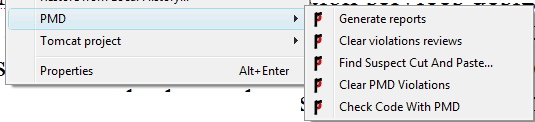
Figure 5: PMD Options in Right-Click Menu
The location and number of violations is then displayed in the PMD view.
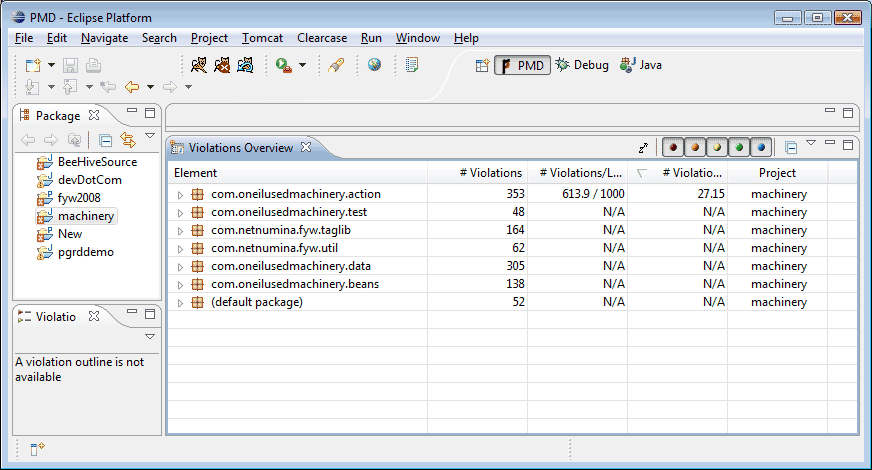
Figure 6: Check Code with PMD Results
You can drill down in the Violations Overview from the level you ran the check at all the way to individual line and violation description.
If you are introducing PMD mid-stream into a large project, the scan can take a long time. Once PMD has become part of your regular coding environment, getting in the habit of running a scan on each class you have created or updated prior to checking it into source control can save hours of bug hunting, not to mention reducing the possibility of embarrassing comments during code reviews.
After running a code check, the results can be exported by selecting Generate Reports from the PMD menu. A new folder will be added to your project named “reports” where the output will be available in several different formats.
Another cool feature is the ability to search for duplicate code with the Find Suspect Cut and Paste menu selection. The results of this search can help to pin down repeated code that should become part of a utility class.
Customizing PMD
If one reason for messy code is the differing opinions of what constitutes clean code then the expectation that the default rules will be perfect for every project is a bit ambitious. The PMD project takes this into account by making it very easy to customize which rules to enforce and what level of attention they should be given.
The basic view generally won’t need to be changed:

Figure 7: Basic PMD Option
The predefined rules can be edited and removed easily in the preferences view. Changing descriptions to match the text of your coding standards can make the standards themselves easier to remember. As running the code check becomes more of a habit, most developers will tend to have fewer violations as correcting them reinforces remembering how to code to the standards.
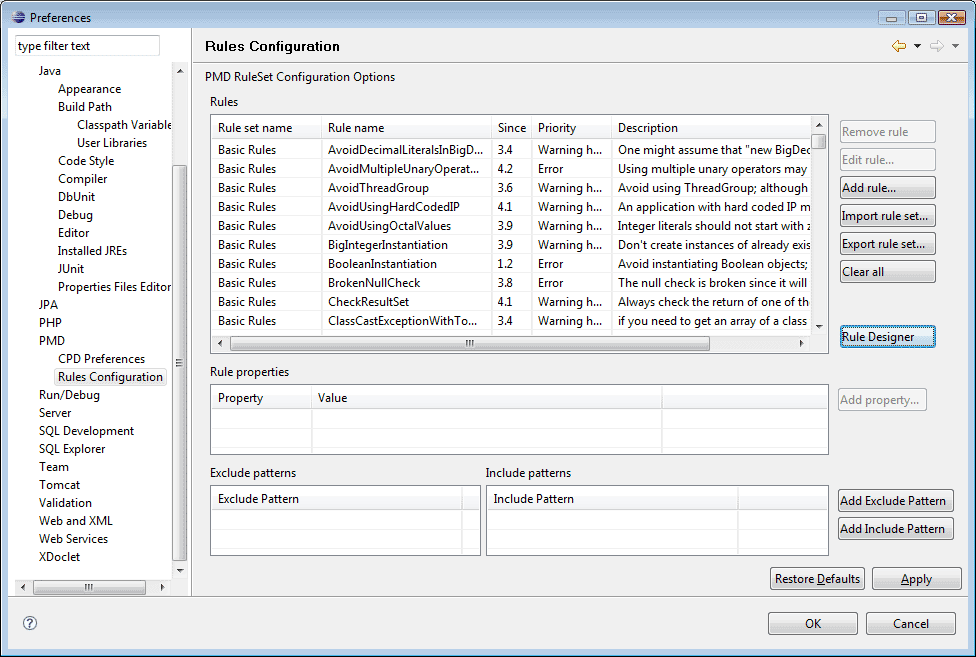
Figure 8: Customize Rules with Configuration
One key option is the violation level. In the code check results view there are color coded toggles to set what level of violations to show (see Figure 6). When time for code review is limited, selecting the higher priority level (lower numbered) violations can help developers and reviewers focus on the most urgent violations.
When determining what level a violation should be it is a good idea to avoid the temptation to go too high as the top level violations will prevent compilation of code.
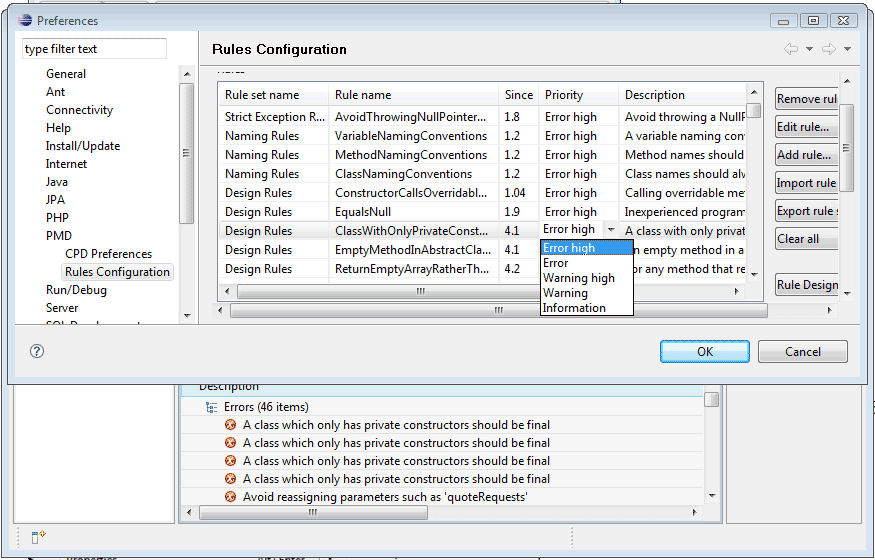
Figure 9: Error High Prevents Compilation
If you are adopting PMD mid project, setting too many violations at the highest level can bring project progress to a screeching halt or drive developers to remove the plug in, both results defeating the purposes of improving quality while saving time. However, if PMD is part of your environment from the first line written, high violation settings can lead to improved code quality throughout the project.
PMD also allows for creating your own rules, a task that is far beyond the scope of this article. Full documentation is available at http://pmd.sourceforge.net/howtowritearule.html. Most teams will find that customizing the descriptions and priorities of the large selection of pre-defined rules will be more than adequate for their needs.
Once the rules have been customized to match your standards, they can be exported for sharing across the enterprise or team.
While the tool itself is simple to install, customize and use, creating practices and policies to get the most of its use may take a bit more work. My personal preference is to make sure all violations at all levels have been addressed prior to the completion of the QA phase. Even with the best-defined rule sets, there will be some exceptions to the rules, and the project allows for this by providing a “Mark as reviewed” option. Using this option adds an annotation at the end of the line of code that will allow the code check to skip that violation in future checks.
Conclusion
PMD is a great tool for improving code quality, developing good habits and speeding up code reviews. It is not a panacea that can completely replace manually reviewing code. Code is an art as well as a science and automated tools have a long way to go before a level of heuristics that can be 100% reliable will be reached.
About the Author
http://www.linkedin.com/in/enterpriseportalarchitect/