There is a support thread tracking the issue about not being able to manage playback speed using apps on devices other than Android (and only if not casting) at https://support.google.com/youtube/thread/153199802. I suggest following it for updates.
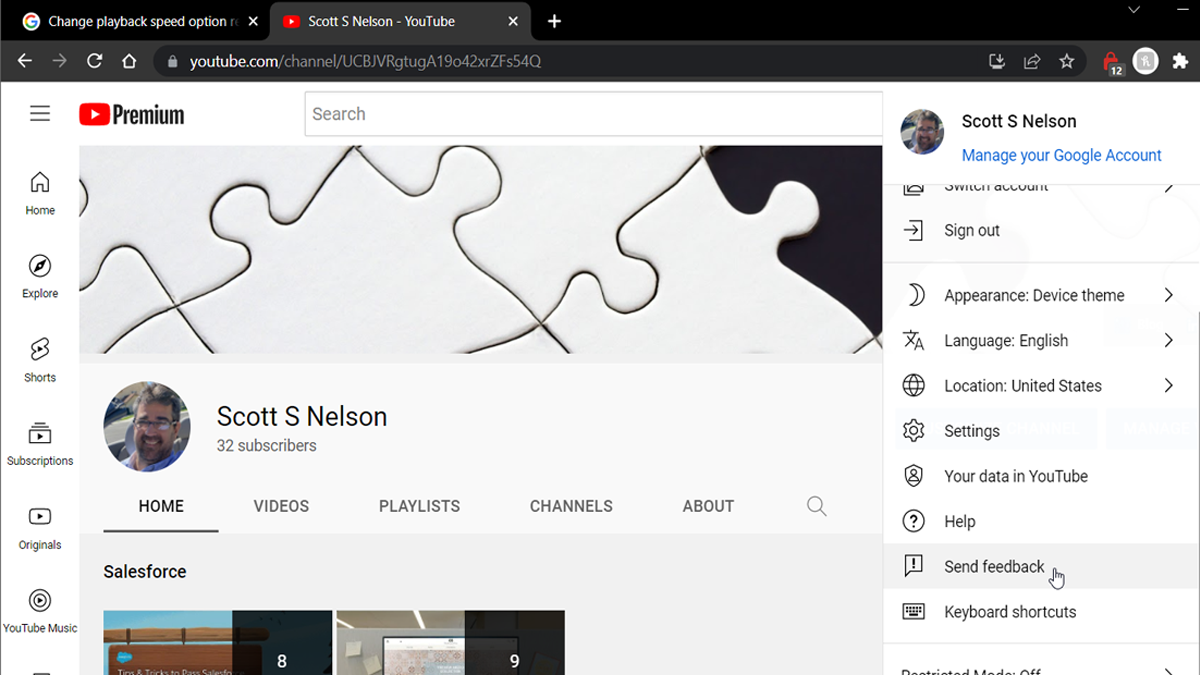
To get action on this, go to YouTube and submit feedback describing the issue and how it impacts your desire to use YouTube.
My use of YouTube is down 50% because of this issue. How about you?
If you don’t know where the feedback option is, please see the Featured Image for this post.
Either my Google search skills are degrading or the signal-to-noise ratio on this topic is so high only the noise comes through. Either way, I am posting a fix I should think would be easy to find but wasn’t…How to complete Visual Studio Code (VSC) updates with Malwarebytes Premium installed.
To say I found no answer is a bit of an exaggeration. I found several that were just plain unhelpful, and one that worked, but not acceptably. The first time this was an issue, I found an unacceptable solution (I say an, because I don’t consider removing Malwarebytes to be a solution, nor any of the less-polite suggestions of what to do with it) was to turn off Malwarebytes to run the update. While this works, every-vigilant Windows thinks it is an opportunity to win back territory for Defender and starts it, which prevents re-starting Malwarebytes. Being a busy techie, re-starting Windows is a long task because I always have at least 20 applications running.
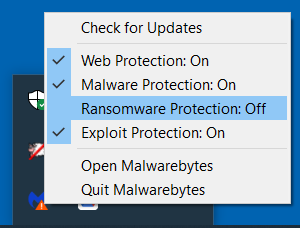
So when the issue came up again today, I dove back into to the deeper Google waters, i.e., page 2 of the results, and did find a suggestion to temporarily uncheck “Enable Protection”. This must have been referring to a different version, as that was not one of the options. There were several others that could be disabled. To cut a long story short (note that whenever that phrase is uttered is inevitably too late already), I went through the options one by one and found that one that allows the installation to complete: Ransomware Protection.
Night vision is the ability to navigate in low-light conditions. There is minimal genetic difference in our native capabilities to do this. The difference is in ones willingness to move forward with limited information and filling in the blanks along the way.
It is like water becoming ice, except those are real nouns. A decision is made up of the best thinking at the time as applied to the knowledge available at the time (emphasis on “at the time”, which is influenced by environment and state of mind). Additional knowledge or further thought can move a decision back to deciding just as melted ice can flow again when the temperature changes.
According to the TOGAF framework, the Generic Role and Skills of the IT Architect includes “produces documentation of design decisions for application development teams or product implementation teams to execute”
The AWS Well-Architected Framework states “The process for reviewing an architecture is a constructive conversation about architectural decisions”. I would like to think that when that the conversation can move the nominalization back to a verb based on those conversations because “.The outcome of the review is a set of actions that should
improve the experience of a customer using the workload.”
This happens every time I update my network password (as required every 60 days). It wasn’t until the third time that I made a note of what to do, and the fourth time where I posted it here so I can find it! I do not use a Mac regularly and freely admit I do not know the reason behind all of the steps (though I do for some, and won’t say which). I will say these steps worked consistently for the last 4 updates:
Log out of BitBucket from the browser
Do a full shut down of Source Tree
Back up and delete ~/Library/Application Support/SourceTree:
cd ~/Library/"Application Support"
mv SourceTree SourceTree.bak
Log in through the browser. Hopefully prompted with Captcha. May take a few tries (more consistent with Chrome than Safari).
Check something out through browser and enter new credentials when prompted. Remember to uncheck save credentials so it will use OAuth.
And yes, I know that this is unnecessary if using the command line. I like the Source Tree UI for managing conflicts and researching who made the change in the source that is currently driving me nuts 🙂