Some Best Practices for Developers

This post consists of excerpts from a previous single page for Best Practices.

Apply Critical Thinking

If you are given a direction and the application of that direction does not appear to adequately solve the requirement, investigate other options. As a contractor it is expected to simply follow direction from the customer regardless of the outcome. As a consultant, it is your job to inform your leader or the client when something does not make sense and to provide a solution as part of the information. Anyone can report an issue; a consultant always includes a solution or an approach towards a solution along with the report.

Test Before QA

Always test either before checking in or creating a Pull Request (depending on your SCM process). The tests need to be as close to how the code will function in the real world as possible. Use a VM if that helps.

Trouble-Shooting

It is the nature of  many developers to check outside their own work first for the root cause of a n issue. Even when this is the case, simply stating that the issue is elsewhere does not result in resolving the issue in a timely manner. Always provide detailed proof of where the issue is occurring outside of your own work in a manner that is irrefutable by the person(s) that will need to address the issue. If there is any doubt about the cause of the issue, you will be made to provide this proof anyways, so have it as part of your explanation the first time.

Perpetual Student

All developers and managers of developers know that learning for a dev is a continuous process. Here are a few tips on amplifying the value of that process:

  • Research solutions every time. Technology is constantly evolving, and the perfect solution used last time may have been replaced by one that is even better.
  • Save your learning files. For years I used an archive disk and am now starting to use GitHub to save all of my learning projects. When research fails to bring a new solution to light and you knew you had solved it once before, the archive will help. So does blogging 🙂 . At the time you are learning you may think you will remember it forever. If you are continuing to learn, you may not.
  • To be continued…
If you found this interesting, please share.

© Scott S. Nelson

Common Sense Isn’t, Especially for Code (Part 2 of 2)

Continued from Part 1

Determine and Describe Dependency Issues Precisely

When debugging an issue always thoroughly check everything that could be wrong with your own code and configurations before looking at factors your code is dependent on. Never assume the issue is with a dependency; find the dependency and describe it in detail. Not doing so leads to longer times to resolution with people focusing on why it isn’t their problem. In the rare circumstance where the dependency issue cannot be clearly identified, include a complete and concise description of what you have checked in your own work before asking others to check theirs.

Clean Your Code as You Go

It is easy to slip into the “I will clean it up later” mindset because you honestly intend to. More often than not, it does not happen because of shifting priorities. At the minimum, you should do your clean ups as you do your check-ins. You will also find it easier to work with your code if it is neatly formatted and well organized as it makes questionable designs stand out more.

Scripts Must Be Non-Destructive

Scripts should always check for perquisites and be written in such a way that if they are run repeatedly the actions will result in a fully functioning system.

When adding files or folders, check for existence and back up existing before changing. Multiple versions of backups should be kept. My general rule of thumb is 3 versions. Older versions should be removed as part of the script to prevent disk space issues.

A rollback approach should always be tested before running the script.

If you found this interesting, please share.

© Scott S. Nelson
Un-Common Sense

Common Sense Isn’t, Especially for Code (Part 1 of 2)

Most of these will seem obvious. If they aren’t, you’re welcome.

No property files in EARs or WARs

Placing property files in a deployment package defeats the purpose of being able to update configuration values without a deployment.

Also be sure that your code supports immediate updates through property files using mechanisms such as a cache that checks for last update or a re-load mechanism that can be fired by the property file change.

Use Naming Conventions

When creating new projects and packages, either follow existing naming conventions/patterns or raise the need for a change and refactor all of them.

Always Use Relative Paths

Should not require a mention as we all know it, but seems folks forget it frequently so this is a reminder.

Always Document

Projects must have a readme that explains how to use the project.

Scripts should have usage notes at the top of the script. Preferably, the script should also do parameter validation and print out usage notes on validation failure.

All Connections Need Timeout Set

If all calls can be managed to a singlet timeout value, set it using an application-server level configuration. If not, manage it on a per connection basis with a single property file external of the deployment archive (usually the EAR or WAR) containing the timeouts to allow for updates to timeouts without compilation.

(Link to Part 2)

If you found this interesting, please share.

© Scott S. Nelson
Iteration 0 will suck

Accept that iteration 0 will suck

While the definition of technical debt is…

…the implied cost of additional rework caused by choosing an easy (limited) solution now instead of using a better approach that would take longer. (https://en.wikipedia.org/wiki/Technical_debt)

the original cause of some tech debt is a combination of optimism and ego while following a best practice that should be expanded on. The best practice is to always keep code in source control to preserve work product in the event of hardware failure or accidental deletion (or the proverbial bus accident/lottery fortune).

The expansion this practice requires to truly be best is to use either a repository naming convention or a branch naming convention to indicate that source is the first iteration. The lack of this naming convention for initial commits leads to acceptance and defensiveness of early approaches that will often benefit from major refactoring if not complete abandonment.

Developers frequently avoid major refactoring for many reasons. In mature systems it can be a very real risk to do so and should be approached cautiously. However, the dislike of refactoring often impacts very early work where such changes can (and should) be done with ease.

Whether it is ego, optimism, laziness, deadline pressure, or a combination of any or all of the common factors, using naming conventions that make it clear that refactoring or replacement is expected will help to prevent early tech debt that will  likely worsen over time.

The next level is to maintain and architecture decision log for the repository and require an entry to that log for any first iteration commits to reach a status where the code will be deployed. Reviewing these decisions periodically will help identify both intentional (assuming an exception log as well) and unintentional technical debt.

If you found this interesting, please share.

© Scott S. Nelson
Compact Layout

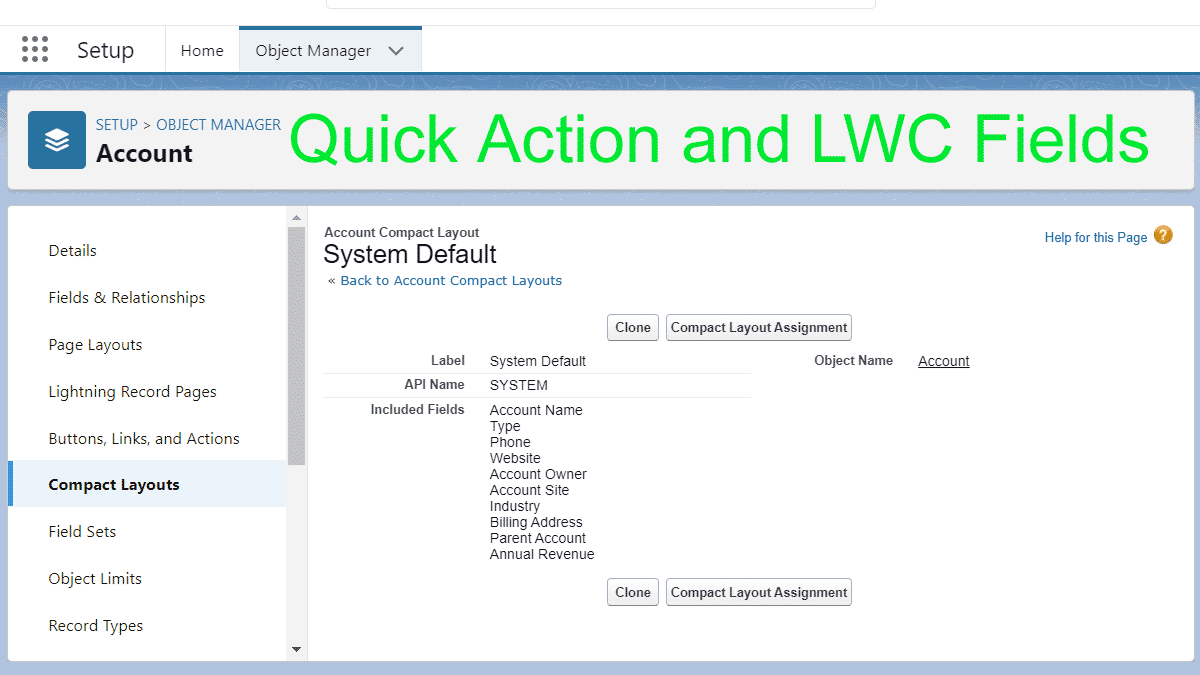
Where to edit Quick Action, Global Action, and most LWC field lists

A frequent question on Trailhead for new admins and developers is how to edit the fields displayed in quick actions, global actions, and Lightning components. Most of the time these fields are managed through the Compact Layout for an object.

From there you can clone the default layout and create your own. Required fields must have a value for the action to work, though these fields can be left off if they have default values or there is a before action that sets the value.

HTH

Compact Layout
Compact Layout
If you found this interesting, please share.

© Scott S. Nelson