
This one was really frustrating for me, because support kept saying “you have the wrong org”, even after getting a new one with the link they provided four times. Finally, a support rep helped me find a solution (thank you, Kiran Kumar!).
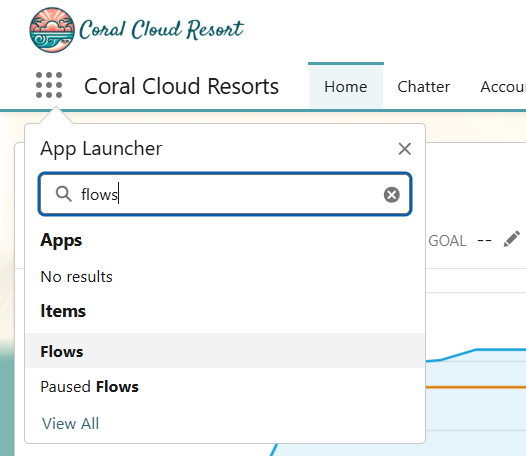
First instead of going to Flows through Setup, they had me go to Flows through the Apps navigation:
Next, change the view from the default to All Flows:
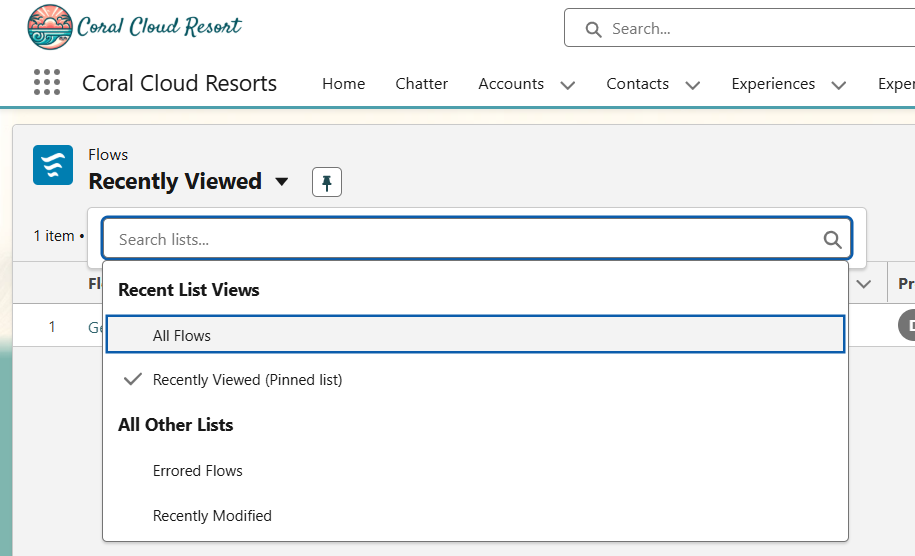
And then search for Get Celebration Details (and you will):

However, when this all started for me, I apparently had a corrupt org, so it still wasn’t there. Support insisted that I sign up for a new org 3 times, and the flow was not seen in all three. Once they pointed me to the App solution, I did find it in one of those orgs. Rather than start the whole module over, I exported the flow from the org where it was and imported it into the org where I had completed the rest of the module.
And, for those who don’t want to go through all of that, you can download the flow metadata directly from
https://github.com/ssnsolutionist/ssnsolutionist/blob/main/Get_Celebration_Details.flow-meta.xml